Using Filterable Fields in Azure AI Search for RAG-based GenAI Applications

With the huge hype Retrieval Augmentation Generation (RAG) in the GenAI applications, vector databases play a vital role in these applications.

Azure AI Search is a leading cloud-based solution for indexing and querying a variety of data sources and a vector database, which is widely used in production-level applications.

Similar to any cloud resource, Azure AI Search has different pricing tiers and limitations. For instance, if you choose the Standard S1 pricing tier, you can create a maximum of 50 indexes.

Recently, a use case arose where I had to create more than 50 individual indexes in a single AI Search resource. It’s a use case for a RAG-based application for an e-library, where each book should be indexed and have a logical separation between them.

The easiest way forward would be to create a separate index inside the vector database for each book. This was not feasible since the maximum number of indexes in S1 was 50, more than the number of books in the library. Being cost-conscious, there was no room for going for Standard S2 or a higher pricing tier. The actual storage required for all the indexes was not even 100GB. So, S1 was the choice to go with an approach to having a separation between the embeddings of each book.

My approach was to add an additional metadata field for the index and make it a filterable field. Then, the book’s name can be added as a value, which can then be used to filter the particular book when we query it through the API.

The embedding was done using the ada-002 embedding model and GPT-4o was used as the foundational model within the application.

Let’s walk through how that was done with the aid of the LangChain framework.

01. Import required libraries

We use the LangChain Python library to orchestrate LLM-based operations within the application.

import os
from langchain_community.vectorstores.azuresearch import AzureSearch
from langchain_openai import AzureOpenAIEmbeddings
from langchain_community.document_loaders import DirectoryLoader


from azure.search.documents.indexes.models import (
    SearchableField,
    SearchField,
    SearchFieldDataType,
    SimpleField
)

02. Initiate the embedding model

The ada-002 model has been used as the embedding model of this application. You can use any embedding model of choice here.

embeddings: AzureOpenAIEmbeddings = AzureOpenAIEmbeddings(
    azure_deployment= EMBEDDING_MODEL,
    openai_api_version= AZURE_OPENAI_API_VERSION,
    azure_endpoint= AZURE_OPENAI_ENDPOINT,
    api_key= AZURE_OPENAI_API_KEY,
)
embedding_function = embeddings.embed_query

03. Create the structure of the index within the vector database

We create the structure of the index by configuring an additional metadata field for it. This should be filterable since we will filter the content in the index with the value of it.

index_fields = [
    SimpleField(
        name="id",
        type=SearchFieldDataType.String,
        key=True,
        filterable=True,
    ),
    SearchableField(
        name="content",
        type=SearchFieldDataType.String,
        searchable=True,
    ),
    SearchField(
        name="content_vector",
        type=SearchFieldDataType.Collection(SearchFieldDataType.Single),
        searchable=True,
        vector_search_dimensions=len(embedding_function("Text")),
        vector_search_profile_name="myHnswProfile",
    ),
    SearchableField(
        name="metadata",
        type=SearchFieldDataType.String,
        searchable=True,
    ),
    # Additional field to store the name of the book
    SearchableField(
        name="book_name",
        type=SearchFieldDataType.String,
        filterable=True,
    )
]

04. Create the Azure AI Search vector database

We create the Azure AI Search vector database with custom field configurations that were initiated before.

vector_store: AzureSearch = AzureSearch(
    azure_search_endpoint= AZURE_SEARCH_ENDPOINT,
    azure_search_key= AZURE_SEARCH_KEY,
    index_name= "index_of_books",
    embedding_function= embedding_function,
    fields = index_fields
)

05. Loading documents from a local directory

Any loader available in LangChain can be used to load the content. In this context, the pages array contains all the pages from a single book.

loader = DirectoryLoader("../", glob="**/*")
pages = loader.load()

06. Add the additional metadata field for each document object

The content of the book is read as LangChain documents. We should add a value for the custom filterable field that we initiated in the structure. We can assign the book’s name for that field by running through a simple loop. The value of it should be changed when the pages of a new book is loaded through the loader.

for page in pages:
    metadata = page.metadata
    metadata["book_name"] = "Oliver_Twist"
    page.metadata = metadata

07. Adding the embeddings to the vector store

The customised content can be now added to the vector storage

vector_store.add_documents(pages)

The Retrieval Process

As mentioned in the use case, the usage of adding a customised filterable field for the index is to retrieve the required documents only when answering a user query. For instance, in this use case if we only want to get answers from the book “Oliver Twist” we should only read the embeddings from that particular book. This can be done using the filter argument when parsing this through the OpenAI API. Here’s the sample body of the JSON request I sent for the API to get the filtered content. The filtration follows the OData $filter syntax.

  {  
  "data_sources": [
    {
      "type": "azure_search",
      "parameters": {
        "filter": "book_name eq 'Oliver_Twist'",
        "endpoint": "https://<SEARCH_RESOURCE>.search.windows.net",
        "key": "<AZURE_SEARCH_KEY>",
        "index_name": "index_of_books",
        "semantic_configuration": "azureml-default",
        "authentication": {
          "type": "system_assigned_managed_identity",
          "key": null
        },
        "embedding_dependency": null,
        "query_type": "vector_simple_hybrid",
        "in_scope": true,
        "role_information": "You are an AI assistant find information from the books in the library.",
        "strictness": 3,
        "top_n_documents": 4,
        "embedding_endpoint" : "<EMBEDDING_MODEL>",
        "embedding_key": "<AZURE_OPENAI_API_KEY>"
      }
    }
  ],
  "messages": [
    {
      "role": "system",
      "content": "You are an AI assistant find information from the books in the library."
    },
    {
      "role": "user",
      "content": "Please provide me with the summary of the book."
    }
  ],
  "deployment": "gpt-4o",
  "temperature": 0.7,
  "top_p": 0.95,
  "max_tokens": 800,
  "stop": null,
  "stream": false
}

Note that on line 6, we use the filter field to retrieve only the embeddings with the particular book name. Multiple filterable fields are also possible, and they can be used in complex applications. You should remember that using filterable fields makes the search a bit slow but convenient in the use cases where you need a logical separation and filtration capability for the embeddings within the vector store.

Happy to hear about interesting use cases you came up with similar patterns. 🙂

What’s Best for Me? – 5 Data Analytics Service Selection Scenarios Explained

With the extensive usage of cloud-based technologies to perform machine learning and data science related experiments, choosing the right toolset/ platform to perform the operations is a key part for the project success.

Since selecting the perfect toolset for our ML workloads maybe bit tricky, I thought of sharing my thoughts on that by getting a couple of generic use cases. Please keep in mind that the use cases I have chosen and the decisions I’m suggesting are totally my own view on the scenarios and this may differ based on different factors (amount of data, time frame, allocated budget, ability of the developer etc.) you have with your project. Plus, the suggestions I’m pointing out here are from the services comes with Microsoft Azure cloud. This maybe the easily adjusted for other cloud providers too.

Scenario 1:

We are a medium scale micro financing company having our data stored on Microsoft Azure. We have a plan to build a datalake and use that for analytical and reporting tasks. We have a diverse data team with abilities in python, Scala and SQL (most of the data engineers are only familiar with SQL). We need to build a couple of machine learning models for predictions. What would be the best platform to go forward with? Azure Databricks or Azure ML Studio?

Suggestion: Azure Databricks

Reasons:

  • Databricks is more flexible in ETL and datalake related data operations comparing to AzureML Studio.
  • You can perform data curation and machine learning within a single product with Azure Databricks.
  • Databricks can connect with Azure Data Factory pipelines to handle data flow and data curation tasks within the datalake.
  • Since the data engineers are more familiar with SQL, they’ll easily adapt with SparkSQL on Databricks.
  • Data team can develop their machine learning experiments with any language of their choice with Databricks notebooks.
  • Databricks notebooks can be used for analytical and reporting tasks even with a combination of PowerBI.
  • Given that, the company is planning for building a datalake, Databricks is far more flexible in ETL tasks. You can use Azure Data Factory pipelines with Databricks to control the data flow of the datalake.

Scenario 2:

I’m a computer science undergrad. I’m doing a software project to predict several types of wildflowers by capturing images from a mobile phone. I’m planning to build my computer vision model using TensorFlow and Keras and expose the service as a REST API.  Since I’m not having the infrastructure to train the ML models, I’m planning to use Azure for that. Which tool on Azure should I choose?

Suggestion: Azure ML Studio

Reasons:

  • AzureML provides a complete toolset to train, test and deploy a deep learning model using any open-source framework of your choice.
  • You can use the GPU training clusters on AzureML to train your models.
  • It’s easy to log your model training and experiments using AzureML python SDK.
  • AzureML gives you the ability for model management and exposing the trained model as a REST API.
  • Small learning curve and adaptability.

Scenario 3:

I’m the CEO of a retail company. I’m not having a vast experience with computing or programming but having a background in maths and statistics. I have a plan to use machine learning to perform predictive analysis with the data currently having in my company. Most of the data are still in excel! Someone suggested me to use Azure. What product on Azure should I choose?

Suggestion: Azure ML Studio

Reasons:

  • For a beginner in machine learning and data science, Azure ML Studio is a good start.
  • AzureML Studio provides no-code environments (Azure ML designer and AutoML) to develop ML models.   
  • Since, you are mostly in the experimental stage and not going for using bigger datasets, using Databricks would be an overkill.
  • You can easily import your prevailing data and start experimenting and playing around with them without any local environmental setup.

Scenario 4:

I’m the IT manager of a large enterprise who are heavily relying on data assets with our decision-making process. We have to run iterative jobs daily to retrieve data from different external sources and internal systems. Currently we have an on-prem SQL database acting as the data warehouse.  Company has decided to go for cloud. Can Azure serve our needs?   

Suggestion: Yes. Azure can serve your need with different tools in the data & AI domain.

Reasons:

  • You can use Azure Synapse Analytics or Azure Data Factory to build data pipelines and perform ETL operations.
  • The local data warehouse can be easily migrated to Azure cloud.
  • You can use Azure Databricks in-order to perform analytics tasks.
  • Since the enterprise in large and scaling, using Databricks would be better with its Spark based computation abilities.

Scenario 5:

We are an agricultural company growing forward with adopting modern Agri-tech into the business. We collect numerous data values from our plantations and store them in our cloud databases. We have a set of data scientists working on data modelling and building predictive models related to crop fertilizing and harvesting. They are currently using their own laptops to perform analysis and it’s troublesome with the data amount, platform configurations and security. Will Azure ML comes handy in our case?

Suggestion: Yes. Azure ML Studio would be a good choice.

Reasons:

  • AzureML can be easily adaptable as an analytical platform.
  • The cloud databases can be connected to AzureML, and data scientists can straight-up start working on the data assets.
  • AzureML is relatively cheap comparing to Databricks (Given the data amount is manageable in a single computer.)
  • It’s easy to perform prototyping of models using AutoML/ AzureML Designer and then implement the models within a short time frame.  

Generally, these are the factors I would keep in mind when selecting the services for ML/ data related implementations on Azure.

  • Azure ML studio is good when you are training with a limited data, though Azure ML provides training clusters, the data distribution among the nodes is to be handled in the code.
  • AzureML Studio comes handy in prototyping with AzureML designer and Automated ML.
  • Azure Databricks with its RDDs is designed to handle data distributed on multiple nodes which is advantageous when your you have big datasets.
  • When your data size is small and can fit in a scaled up single machine/ you are using a pandas dataframe, then use of Azure Databricks is an overkill.
  • Services like Azure Data Factory and Datalake storage can be easily interconnected for building  

Let me know your thoughts on these scenarios as well. Add your queries in the comments too. I’ll try my best to provide my suggestions for those use cases.

MLOps : Let’s start plumbing ML experiments!

What’s all this hype on MLOps? What’s the difference between machine learning and MLOps? Is MLOps essential? Why we need MLOps? Through this article series we going to start a discussion on MLOps to get a good start with the upcoming trend. The first post is not going to go deep with technicalities, but going to cover up essential concepts behind MLOps.

What is MLOps?

As the name implies, it is obviously having some connection with DevOps. So, will see what DevOps is first.

“A compound of development (Dev) and operations (Ops), DevOps is the union of people, process, and technology to continually provide value to customers.”

Microsoft Docs

This is the formal definition of DevOps. In the simpler terms, DevOps is the approach of streamlining application development life cycle of software development process. It ensures the quality engineering and security of the product while making sure the team collaboration and coordination is managed effectively.

Imagine you are a junior level developer in a software development company who develops a mission critical system for a surveillance application. DevOps process make sure each and every code line you write is tracked, managed and integrated to the final product reliably. It doesn’t stop just by managing the code base. It involves managing all development life cycle steps including the final deployment and monitoring of the final product iteratively too.

That’s DevOps. Machine Learning Operations (MLOps) is influenced by DevOps principles and practices to increase the efficiency of machine learning workflows. Simply, it’s the way of managing ML workflows in a streamlines way to ensure quality, reliability, and interpretability of machine learning experiments.

Is MLOps essential?

We have been playing around with machine learning experiments with different tools, frameworks and techniques for a while. To be honest, most of our experiments didn’t end up in production environments :D. But, that’s the ultimate goal of predictive modeling.

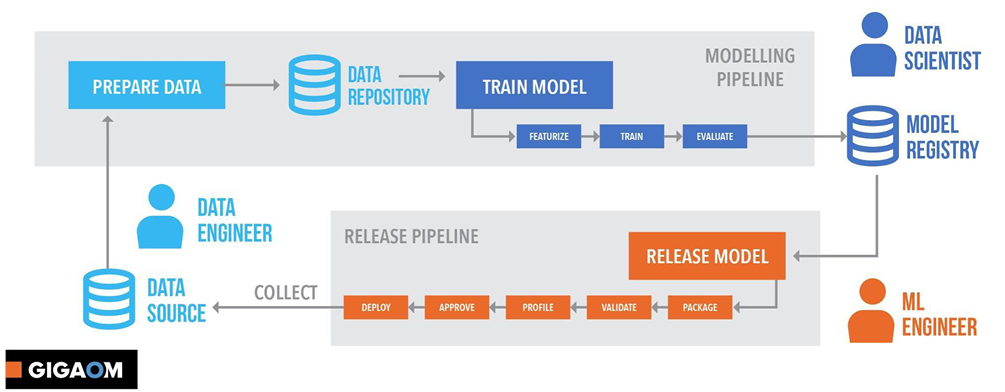
Machine Learning experiment is an iterative process
Source : https://azure.microsoft.com/en-au/resources/gigaom-delivering-on-the-vision-of-mlops/

Building a machine learning model and deploying it is not a single step process. It starts with data collection and goes in an iterative life cycle till monitoring the deployed model in the production environment. MLOps approaches and concepts streamline these steps and interconnect them together.

Answer is Yes! We definitely need MLOps!

Why we need MLOps?

As I said earlier, MLOps interconnect the steps in ML life cycle and streamline the process.

I grabbed these points from Microsoft docs. As it implies, these are the goals of MLOps.

  • Faster experimentation and development of models

Good MLOps practices leads for more code and component reusability which leads for faster experiments and model development. For an example, without having separate training loops or data loading components for each experiment, we can reuse an abstract set of methods for those tasks and connect them with a machine learning pipeline for running different experiment configurations. That’s make the life easy of the developer a lot!

I do lot of experiments with computer vision. In my case, I usually have a set of abstract python methods that can be used for model training and model evaluation. When performing different experiments, I pass the required parameters to the pipeline and reuse the methods which makes the life easy with less coding hassle.    

  • Faster deployment of models into production

Machine learning model deployment is always a tricky part. Managing the endpoints and making sure the deployment environment is having all the required platform dependencies maybe hard to keep track with manual processes. A streamlines MLOps pipeline helps to manage deployments by enabling us to choose which trained model should go for production etc. by keeping track of a model registry and deployment slots.

  • Quality assurance and end-to-end lineage tracking

Maintaining good coding practices, version controlling, dataset versioning etc. ensures the quality of your experiments. Good MLOps practices helps you to find out the points where errors are occurring easily rather than breaking down the whole process. Will say your trained model is not performing well with the testing data after sometime from model deployment. That might be caused by data drift happened with time. Correctly configured MLOps pipeline can track such changes in the inference data periodically and make sure to notify such incidents.

  • Trustworthiness and ethical AI

This is one of the most important use cases of MLOps. It’s crucial to have transparency in machine learning experiments. The developer/ data scientist should be able to interpret each and every decision they took while performing the experiment. Since handling data is the key component of ML model, there should be ways to maintain correct security measures in experiments too. MLOps pipelines ensure these ethical AI principles are met by streamlining the process with a defined set of procedures.

How we gonna do this?

Now we all know MLOps is crucial. Not just having set of python scripts sitting in a notebook it’s all about interconnecting all the steps in a machine learning experiments together in an iterative process pipeline. There are many methods and approaches to go forward with. Some sits on-prem while most of the solutions are having hybrid approach with the cloud. I usually use lot of Azure services in my experiments and Azure machine learning Studio provides a one-stop workbench to handle all these MLOps workloads which comes pretty handy. Let’s start with a real-world scenario and see how we can use Azure Machine Learning Studio in MLOps process to streamline our machine learning experiments.

FAQs on Machine Learning Development – #AskNaadi Part 1

Happy 2022!

It’s almost 7 years since I started playing with machine learning and related domains. These are some FAQs that comes for me from peers. Just added my thoughts on those. Feel free to any questions or concerns you have on the domain. I’ll try my best to add my thoughts on that. Note that all these answers are my personal opinions and experiences.

01. How to learn the theories behind machine learning?

The first thing I’d suggest would be ‘self-learning’. There are plenty of online resources out there where you can start studying by your own. Most of them are free. Some may need a payment for the certification (That’s totally up to you to pay and get it). I’ve listed down some of the famous places to get a kickstart for learning AI. Just take a look here.

Next would be keep practising. Never stop coding and training models in various domains. Kaggle is a good place to sharpen your skill set. Keep learning and keep practising at the same time.

02. Do we really need mathematics for ML?

Yes. To some extend you should know the theories behind probability and and some from basic mathematics. No need to worry a lot on that. As I said previously, there are plenty of places to catch up your maths too.

03. Is there a difference between data analysis and machine learning?

Yes. There is. Data analysis is about find pattern in the prevailing data and obtain inferences due to those patterns. It may have the data visualization components too. When is comes to machine learning, you train a system to learn those patterns and try to predict the upcoming pattern.

04. Does the trend in AI/ML going to fade out in the near future?

Mmm.. I don’t think so. Can’t exactly say AI is going to be ‘the’ future. Since all these technical advancements going to generate hell a lot of data, there should be a way to understand the patterns of those data and get a value out of that. So, data science and machine learning is going to be the approach to go for.

Right… those are some general questions I frequently get from people. Let’s move into some technicalities.

05. What’s the OS you use on your work rig?

Ubuntu! Yes it’s FOSS and super easy to setup all the dependencies which I need on it. (I did a complete walk through on my setup previously. Here’s it). Sometimes I use Windows too. But if it’s with docker and all, yes.. Ubuntu is the choice I’m going with.

06. What’s your preferred programming language to perform machine learning experiments?

I’m a Python guy! (Have used R a little)

07. Any frameworks/ libraries you use most in your experiments?

Since am more into deep learning and computer vision, I use PyTorch deep learning framework a lot. NumPy, Sci-kit learn, Pandas and all other ML related Python toolkits are in my toolbox always.

08. Machine learning is all about neural networks right?

No it’s not! This is one of the biggest myths! Artificial neural networks (ANNs) are only one family of algorithms which we can perform machine learning. There are plenty of other algorithms which are widely used in performing ML. Decision trees, Support Vector Machines, Naive Bayes are some popular ML algorithms which are not ANNs.

09. Why we need GPUs for training?

You need GPUs when you need to do parallel processing. The normal CPUs we have on our machines are typically having 4-5 cores and limited number of threads can be handled simultaneously. When it comes to a GPU, it’s having thousands of small cores which can handle thousands of computational threads in parallel. (For an example Nvidia 2080Ti is having 4352 CUDA cores in it). In Deep learning, we have to perform millions or calculations to train models. Running these workloads in GPUs is much faster and efficient.

10. When to use/ not to use Deep learning?

This is a tricky questions. Deep learning is always good in understanding the non-linear data. That’s why it’s performing really well in computer vision and natural language processing domains. If you have a such task, or your feature space is really large and having a massive amount of data, I’d suggest you to go with deep learning. If not sticking with traditional machine learning algorithms might be the best case.

11. Do I need to know all complex theories behind AI to develop intelligent applications?

Yes and No. In some cases, you may have to understand the theories behind AI/ML in order to develop a machine learning based applications. Mostly I would say model training and validation phases need this knowledge. Will say you are a software developer who’s very good with .Net/ Java and you are developing an application which is having a component where you have to read some text from a scanned document. You have to do it using computer vision. Fortunately you don’t have to build the component from the scratch. There are plenty of services which can be used as REST endpoints to complete the task. No need to worry on the underlying algorithms at all. Just use the JSON!

12. Should I build all my models from scratch?

This is a Yes/No answer too. This question comes mostly with deep learning model development. In some complex scenarios you may have to develop your models from the scratch. But most of the cases the problem you having can be defined as a object detection/ image classification/ Key phrase extraction from text etc. kinda problem. The best approach to go forward would be something like this.

  • Use a simple ANN and see your data loading and the related things are working fine.
  • Use a pre-trained model and see the performance (A widely used SOTA model would be the best choice).
  • If it’s not working out, do transfer learning and see the accuracy of the trained model. (You should get good results most of the times by this step)
  • Do some tweaks to the network and see if it’s working.
  • If none of these are working, then think of building a novel model.

13. Is cloud based machine learning is a good option?

In most of the industrial use cases yes! Since most of the data in prevailing systems are already sitting in the cloud and industries are heavily relying on cloud services these days, cloud based ML is a good approach. Obviously it comes with a price. When it comes to research phases, the price of purchiasing computation power maybe a problem. In those cases, my approach would be doing the research phase on-prem and moving the deployment to the cloud.

14. I’ve huge computer vision datasets to be trained? Shall I move all my stuff to the cloud?

Ehh… As I said previously, if you planning on a research project, which goes for a long time and need a lot of computational hours, I’d suggest to go with a local setup first, finalize the model and then move to the cloud. (If dollars aren’t your problem, no worries at all! Go for the cloud! Obviously it’s easy and more reliable)

15. Which cloud provider to choose?

There’s a lot of cloud providers out there having various services related to ML. Some provides out of the box services where you can just call and API to do the ML tasks (Microsoft Cognitive services etc. ). There are services where you can use your own data to train prevailing models (Custom Vision service by Azure etc.)

If you want end-to-end ML life cycle management, personally I find Azure ML service is a good solution since you can use any of your ML related frameworks and tools and just use cloud to train, manage and deploy the models. I find MLOps features that comes with Azure Machine Learning is pretty useful.

16. I’ve trained and deployed a pretty good machine learning model. I don’t need to touch that again right?

No way! You have to continuously check their performance and the accuracy they are providing for the newest data that comes to the service. The data that comes into the service may skewed. It’s always a good idea to train the model with more data. So better to have a re-training MLOps pipelines to iteratively check your models.

17. My DL models takes a lot of time to train. If I have more computation power the things will speed up?

mm.. Not all the time. I have seen cases where data loading is getting more time than model training. Make sure you are using the correct coding approaches and sufficient memory and process management. Make sure you are not using old libraries which may be the cause for slow processing times. If your code is clean and clear then try adjusting the computation power.

This is just few questions I noted down. If you have any other questions or concerns in the domain of machine learning/ deep learning and data science, just drop a comment below. Will try to add my thoughts there.

I want to Develop an AI : Azure AI Products, Services & Tools Selection Guideline

Being one of the major public cloud providers, Microsoft Azure provides numarous products, services and tools for intelligent application development. This is a high level guideline to select the appropriate product for your application development.

I have just pinpointed the most used tools and services here. The services can be interconnected with each other in order to develop applications for more complex use cases.

Download the PDF version of the diagram from here.

Handling data sources on Azure Machine Learning

Image source : https://docs.microsoft.com/en-us/azure/machine-learning/concept-data

Being the fundamental and the most vital factor in any machine learning experiment, the way of handling data in your experiments is crucial. Here we going to discuss different ways of managing your data sources inside Azure Machine Learning (AML).

Since the new Azure Machine Learning Service is becoming the one-stop place for managing all ML related workloads in Azure, the functions and methods can be created/managed using the web portal or using AzureML python SDK (You may use AzureML R SDK or the Azure CLI too)

Data comes in all shapes and sizes. In order to tackle these different data scenarios AML offers different options to manage the data. Let’s discuss these options one by one with their usages, pros and cons.

Datastore

Datastore is the place where the data sits in an AML experiment. Your AML workspace can have one or more Datastores connected according to your need.

AML is all about cloud-based machine learning. So that, I would recommend using some sort of Azure based storage to store your data in the first hand. Blob storage, File Share, Data Lake Storage, Azure SQL database, Azure PostgreSQL, Azure DB for MySQL and Databricks file system are currently supported data storage types to create Datastores. (Will say your data is at on-prem SQL database. You can use Azure Data Factory to migrate your data load onto Azure.)

You can see the Datastores registered to your workspace either through AML Studio (ml.azure.com) or through the python SDK. When you create a workspace, by default two Datastores are created : workspacefilestore and workspaceblobstore.

Workspaceblobstore acts as the default Datastore of experiments. You can change it at any time through the SDK. This is the place where all your code and other files you put in the experiment sits.

Is it a good idea to keep your data on the workspaceblobstore?

  • Scenario #1 : You are doing a toy experiment with a small dataset (Eg. a 2 MB CSV file). Dataset is static and no plan on updating that during the experiment. Yes! That’s completely ok to keep the dataset inside workspaceblobstore.
  • Scenario #2 : You are doing a deep learning experiment with a 100,000 images. No! Never use workspaceblobstore to keep your data.

Why not the workspaceblobstore always?

Workspaceblobstore is having a file and storage limitation (300MB and/or 2000 files). So that it’s impossible to use it when we have a large dataset. On the other hand, this directly affects for the docker image size (or the snapshot size) you may create for the experiment. Bulky snapshots or the docker images are not a good thing. Always keep it simple and modularized. So always the workspaceblobstore is a no go!

Datasets

AML datasets is the high-level abstraction of the data you use in experiments. You may create an AML dataset from,

  • A local file / local files
  • Registered datastore (from file(s) sit on a datastore)
  • Web URL
  • Azure Open Datasets

The AML datasets we create may belong to two main types:

  • Tabular datasets – If you have a file/ files that contains data in a tabular format (CSV, JSON line files, Parquet files, Tabular data in SQL databases etc.) creating a tabular dataset would be beneficial as it allows to transform data into a Pandas or Spark DataFrame.    
  • File datasets – Refer to a single or multiple file in your Datastore or on a public URL. File datasets comes handy when you have a scenario like a dataset with 1K images.

AML datasets comes with the advantage of versioning and tracking as well as monitoring. It’s not a hard thing to create perform data drift detection or a simple statistical analysis on data fields of the dataset with a few clicks.  

Microsoft recommends to use AML datasets always in experiments rather than pointing for the datastore directly (which is totally possible). I’ve found out pros and cons in both approaches.

  • AML datasets are easy to version and manage compared to datastore.
  • If you have a tabular dataset, I would always recommend to go for AML tabular datasets.
  • It becomes tricky when you have files. If you use File datasets, you have to use to_path() method to get the list of file paths defined by the dataset. This comes as a flat list! If you are not concerned about the directory structure of the data this is totally fine. But if you wish to create custom dataloaders (Eg. PyTorch custom dataloaders which allows to differentiate classes according to directories) this may not come handy. (You can do a workaround by processing the file path to determine the directory structure though 😀 )  
  • Keep in mind that AML dataset mount() only works for unix-like OS. If you wish to run your experiment on a windows running workstation you may have to download() the dataset.

Will discuss on using these datasets in different model training scenarios in future posts.

There are just some of the experiences I had when playing around with new Azure Machine Learning. The Microsoft Learning GitHub repo (https://github.com/MicrosoftLearning/DP100) for DP100 exam is a really nice place to find some example code on using these functionalities. Let me know your find outs and experiences with AML too 😊

Happy coding!     

Lambda Architecture & Cortana Intelligence Suite solutions

Data processing has become the key part of modern applications. Not only processing the data, but also visualizing data in a meaningful way is vital for making business decisions in an enterprise application.

With the rise of massive data storages and the speed of data generation, effective data processing architectural patterns came into industrial standards.

In the era of big data processing where data generated in high volume, variety, velocity, veracity and value; there are many architectural patterns that industrial applications are following for data processing. Lambda, Kappa and Zeta are some patterns used for real time big data processing.

Let’s take a look on how Lambda architecture can be adopted with the products and services comes with Microsoft Cortana Intelligence Suite.

What is Lambda Architecture?

2 - lambaLambda architecture is a data processing architecture designed to handle massive quantities of data by taking the advantage of both batch and stream processing methods. Nathan Marz introduced the term of Lambda Architecture (LA) for having a generic, scalable and fault tolerant data processing architecture.

LA contains different layers which handles data in various methodologies in the process of data processing.

The ability of processing both batch data and real-time data streams is one of the significant features of lambda architecture.

What is Cortana Intelligence Suite?

architectureCortana Intelligence Suite is the Microsoft’s umbrella branding for fully managed business intelligence, big data and advanced analytics offerings comes with Azure cloud which enables businesses to transform the data into intelligent actions. So “Cortana” is there in this name. Then what? Is this related to the smart assistant comes with Windows 10? As Microsoft says, Cortana symbolizes the contextual intelligence that the solutions hope to deliver across the entire suite.

Cortana Intelligence Suite comes with the following services that specially designed for following tasks.

  • Information Management
  • Big Data Stores
  • Machine Learning & Analytics
  • Intelligence
  • Dashboards & Visualizations

How Cortana Intelligence Suite aligns with Lambda architecture?

Cortana Intelligence Suite (CIS) comes with different solutions that can cater both batch data sources and data streams. It is a significant improvement where you combine traditional batch processing systems and data stream analysis systems.

For an example think of a system that indicates the fuel level, oil levels, car tire pressure etc. of a vehicle… The system too should have the ability to analyze the data fetching from the IoT sensors real time as well as do predictions using the stored batch of data. CIS comes handy with various approaches to design this system with lambda architecture.

Lambda

Usage of CIS tools for data processing

IoT sensors creates hundreds or maybe thousands of data points for a second. Handling such data streams and directing them to analytics flows can be done using Event Hubs(https://azure.microsoft.com/en-us/services/event-hubs/).  you can use Azure Stream Analytics to get data from EventHub into Azure Storage Blobs. Thereafter you can use Azure Data Factory (ADF) to copy data on a scheduled basis from Blobs to Azure Data Lake Store. ADF can act as the batch data source. For analyzing and to build predictive models on the batch data HDInsight & Azure Machine Learning is the option you can go with. Azure SQL data warehouse can be used to store the analyzed data and visualizing them using PowerBI can be done. This is the batch data processing line.

In the line of real time data analysis, you can push the data stream coming from event hub to a Stream Analytics service or for an azure machine learning model. Visualizing data with PowerBI would come handy too.

Apart from the above explained components comes for data processing task, Microsoft Cognitive services can be used for transforming the user interaction for more human side. For an example, Bot framework and LUIS can be used with Bing speech API to provide voice commands for applications. Cortana skills can be used for enabling your app to deal with Cortana assistant.

Democratizing Machine Learning with Cloud

HiRes.jpg.800x600_q96We have already passed the era of gigabytes when it comes to data. World is talking about terabytes of unstructured data and massive amounts of data points generated from IoT devices and sensors in millions per a second. To analyze these heaps of data, obviously, we need large computation power and massive storage. Building workhorse machines to fulfil those tremendous workloads would definitely cost a lot. Cloud computing paradigm comes handy here. The resourcefulness and the scalability of the public cloud can be used to perform the large calculations in machine learning algorithms.

Almost all the major public cloud providers in the market comes up with machine learning services. Cloud machine learning services in Google Cloud Platform provides modern machine learning services, with pre-trained models and a service to generate your own tailored models. Amazon Machine Learning is a service that makes it easy for developers of all skill levels to use machine learning technology. IBM analytics comes up with a machine learning platform with its cloud data services. Azure Machine Learning Studio is a GUI-based integrated development environment for constructing and operationalizing Machine Learning workflow on Azure. We discussed a lot about Azure Machine Learning and its appliances in practical scenarios in the previous posts.

All the mentioned platforms provide machine learning as a service. Most of the platforms offer pre-built ML algorithms in packages. Simple drag and drop user interactions and easy deployment has attracted many developers to use these tools.

But, how would it be if you want to go from the scratch? Either you want to use the power of Graphical Processing Units (GPUs) to process the ML algorithms parallelly? Cloud based Virtual Machines specifically optimized for computation is one of the best solutions that you can consume.

Azure Data Science Virtual Machine (DSVM) –

dsvm

DSVM in Azure Portal

If you already have used Azure virtual machines for your computation, hosting or storage tasks, this would not be a new concept for you. Azure DSVM is specifically optimized for large computations. Azure DSVM comes in two flavors. One with Windows and the other with Linux. You can choose the hardware configurations as you wish. Many development environments, programming IDEs, languages are pre-installed in the VM instances.

dsvm_linuxMy personal favorite here is the Linux DSVM instance. Here I’ve created a Linux DSVM with the basic configurations. For accessing the VM you can use any tool that can do a SSH call. What I normally do is calling the accessing the VM using Ubuntu Bash on Windows 10.

GPUs for machine learning –

GPU_1

GPU_2

Configurations of the Linux VM with Nvidia GPU

Many machine learning algorithms currently available can be executed parallely. Execution parts of those algorithms are embarrassingly parallel. With that parallel programming, you can reduce the execution time of the algorithms drastically. Data scientists in both industry and academia have been using GPUs for machine learning to make groundbreaking improvements across a variety of applications including image classification, video analytics, speech recognition and natural language processing.

google_brain

GPUs Vs. CPU computing

Specially in Deep Learning, parallel processing using GPUs can make a drastic decrease in computation time. Purchasing a deep learning dream machine powered with a CUDA enabled high-end GPU such as Nvidia Tesla K80 would cost nearly 6000 dollars! Rather than spending a lot on a machine like that, the most feasible plan is to provision a virtual machine with the specifications we need and pay as we consume.

VM_size

VM instance price plans

The N-series is a family of Azure Virtual Machines with GPU capabilities that you can use for these kinds of tasks. The N-series will feature the NVIDIA Tesla accelerated platform as well as NVIDIA GRID 2.0 technology, providing the highest-end graphics support available in the cloud today. Through your Azure portal, you can choose a desired price plan with the desired configurations for your tasks when provisioning the VM.

teslaHere’s my Azure VM specifically configured for deep learning exercises. The machine is powered with Tesla K80 GPU which is having 4992 cores in it!! I installed anaconda for that and doing computations using Jupyter notebooks.

Just a hint: stop your VM instance when you are not using it for computation to avoid getting huge unnecessary bills. 😉

No need of huge wallets! The wise decision would be applying cloud technologies for machine learning.

Azure ML Web Services gets a new look

Huge buzz going on Machine Learning. What for?  Building intelligent apps is one of the dominant usages of machine learning. Web service is one of the understandable “language” for software developers. If the data scientists can provide a web service for the line of devs, they’ll be super excited because they only have to deal with JSON; not regression algorithms or neural networks! 😀

Azure ML studio provides you the power to deploy web services easily and nice interface that a software developer can understand. Consuming a web service built with Azure machine learning has become pretty easy because it even provide you the code samples and the sample JSONs that transfer in and out.

web-services

services.azureml.net


Recently AzureML Studio has come out with a new interface for managing the web services. Now it’s pretty easy for manage and monitor the behavior of your web services.

Go for your ML Studio. In web services section, you’ll find a new link directing to “New web services experience”. Currently it’s in the preview.

dashboard

New web services dashboard


Dashboard shows the performance of the web service that you built. The average execution time is shown there. Even you can get a glimpse on monetary terms attached with consuming the web service with the dashboard.

Testing the web services can be done through the new portal. If you want to build web application to consume the web service you built, can direct to the azure web app template that is pre-built for consuming ML web services.

Take a look from (http://services.azureml.net)  you’ll get used to it! 😀


Modules & Capabilities of Azure Machine Learning – Azure ML Part 03

Through the journey of getting familiar with Azure Machine Learning, cloud based machine learning platform of Microsoft, we discussed about the very first steps of getting started.
When you open up the online studio through your favorite web browser, you’ll directed to create a blank experiment. Let’s start with it.

start screen
Blank Experiment in Azure ML Studio

In your left hand side of the studio, you can see the pre-built modules that you can use to develop your experiments. If they are not enough for your case, you can use R or Python scripts in your experiment.
With Azure ML Studio, you get the ability to deploy models for almost all the machine learning problem types. The algorithms you can use for classification, regression and clustering are in the AML cheat sheet that you can download from here.(http://download.microsoft.com/download/A/6/1/A613E11E-8F9C-424A-B99D-65344785C288/microsoft-machine-learning-algorithm-cheat-sheet-v6.pdf)    machine-learning-algorithm-cheat-sheet-small_v_0_6-01

Will take a look into the sections that modules are categorize. If you want to find a specific module, what you have to do is search the experiment item from the search box.

Saved datasets – You can find out a set of sample datasets that you can use for experiments. Most of the popular machine learning related datasets like “iris dataset” are available here. If you want your own dataset in the studio, you can upload it to here.

Trained models – These are the models that you get as the output after training the data using an appropriate algorithm and methodology. They can be used for building another experiment or a web service later.

Data Format Conversions – The data comes in and going out from the experiment can be converted into a desired format using the modules in this section. If you wish to convert the output of your experiment to ARFF format (which supported in Weka) or to a CSV file you can use the modules here.

Data input & output – Azure ML has the ability to get data from various sources directly.  You can use an Azure SQL database, Azure BLOB storage or a hive query to get the data. Fetching data from a local SQL server is on preview yet (August 2016).

Data transformation – Data transformation tasks like normalization, clipping etc. can be done using the modules listed in this section. You can use SQL queries to do the data transformations if want.

Feature Selection – Appropriate feature selection increases the accuracy of your machine learning model drastically. There are three different methods as “Filter bases feature selection, Fisher linear discrimination and Permutation feature importance” that you can use according to your requirement.

Machine Learning – Within this section you can find out the modules built for training machine learning models, evaluate accuracy etc. Most of the popular machine learning algorithms used for classification, clustering and regression problems are listed down here as modules. The parameters of each module can be changed or use can you Tune Model Hyperparameters module to tune-up the experiment to get the optimal output.

OpenCV library Modules – ML is widely using in image recognition. In Azure ML there’s Predefined Cascade Image Classification that is trained to identify the images with front facing human faces.

Python language models – Python is one of the widely using languages in data mining and machine learning applications. With Azure ML studio you have the ability to execute your own python script using this module. 200+ common python libraries are supported with Azure ML right now.

R language models – Same as Python, R is one of the most favorite statistical languages among data scientists. You can use your favorite R scripts and train models with R using these modules. Most of the R packages are supported in Azure ML. If the package is not there you can import the packages for the experiment. (Unfortunately there are some limitations in this. Some R packages like RJava, openNLP are not supported yet with Azure ML – Aug.2016)

Statistical Functions – If you want to do some mathematical functions for the data or perform statistical operations, here you can find out the modules for that. A basic descriptive statistical analysis on the dataset also can be performed using the modules.

Text Analytics – Machine learning models can be used for text analytics. There are some modules included in Azure ML studio for text preprocessing (omit the stop words, punctuation marks, white spaces etc.), Named entity recognition (Pre trained module) and many more. Vawpal Wabbit learning system library is also included in the modules for the use.

Web service – One of the most notable advantages in Azure ML is the ability to deploy as a web service. Here’s the web service input and output modules that can be used for the built experiments.

Deprecated – Assigning data for clusters, binning, quantizing data, cleansing missing data can be done using these modules.

Building Azure ML experiments and deploying web applications using them are not that hard.

This is one of the best step by step guide for that task from MSDN.

In the coming posts will discuss on interesting applications in Azure ML hacks to build your predictive models.
Play with the tool and leave your experience as comments below.  🙂