Using PySpark’s PartitionBy Function for String Column in Data Partitioning

In the previous blog post, we looked into data partitioning in Spark applications and the benefits it brings to the table. An essential consideration for data partitioning is deciding which data field or column to employ as the basis for partitioning your data.

When your data includes categorical or temporal columns, the choice for a partitioning column is relatively straightforward. However, what if you find yourself faced with a string column that needs to serve as the partitioning factor? It doesn’t make sense to partition data based on a multitude of distinct string values, and this approach won’t necessarily lead to optimal Spark performance.

There’s a clever technique that can be employed to partition Spark DataFrames based on the values within a string column. It involves using the first letter of each string value as the partitioning criterion. This method not only simplifies the partitioning process but can also enhance the efficiency of your Spark operations.

Here’s a simple example on performing data partitioning based on the first letter of a string column.

# create a list of tuples containing data
data = [("Alice", 25), ("Bob", 30), ("Charlie", 35), 
              ("Dave", 40), ("Eliza", 23), ("'Owen", 21)]

# create a PySpark DataFrame from the list of tuples
df = spark.createDataFrame(data, ["Name", "Age"])

# Create partioning column and add it to the DataFrame
df = df.withColumn("Name_first_letter", df.Name.substr(1, 1))

# Remove non-alphanueric characters from Name_first_letter column
# This ensure that the partitioning column is a valid directory name
df = df.withColumn("Name_first_letter", 
                  df.Name_first_letter.regexp_replace("[^a-zA-Z0-9]", "_"))

# Write the PySpark DataFrame to a Parquet file 
# partitioned by Name_first_letter
df.write.partitionBy("Name_first_letter").parquet("data/output/df_parquet")

Partitioning a PySpark DataFrame by the first letter of the values in a string column can have several advantages, depending on your specific use case and data distribution. Here are some potential advantages:

  • Improved Query Performance: Partitioning can significantly improve query performance when you often filter, or aggregate data based on the first letter of the string column. By partitioning the data by the first letter, you can avoid scanning the entire DataFrame for each query, and instead, the query engine can efficiently skip irrelevant partitions.
  • Faster Data Retrieval: When you’re looking for specific records that start with a particular letter, partitioning makes it faster to retrieve those records. It reduces the amount of data that needs to be read and processed.
  • Parallelism: Partitioning allows for better parallelism in data processing. Different tasks can work on different partitions concurrently, which can lead to improved overall performance.
  • Reduced Shuffling: Partitioning can reduce data shuffling during operations like joins and aggregations.
  • Easier Data Maintenance: If your data frequently changes, partitioning can make it easier to update or append data to specific partitions without affecting the entire dataset. This can be particularly useful for scenarios where you have a large historical dataset and regularly receive new data.

It’s worth noting that while partitioning can offer these advantages, it also comes with some trade-offs. Partitioning can increase storage overhead because it creates multiple directories/files on the storage system. Additionally, it requires careful planning to choose the right partitioning strategy based on your query patterns and data characteristics.  

Optimising Spark Analytics: The PartitionBy Function

Apache Spark is an open source, distributed computing framework designed for big data processing and analytics.  Spark was created to address the shortcomings of MapReduce in terms of use and versatility.

Recently I was using Spark framework (Through PySpark API) on Azure Synapse Analytics extensively for analysing bulks of retail data.  Following better optimising approaches makes a huge difference in runtimes when it comes to Spark queries.

Among several Spark optimisation methods, I thought of discussing the importance of data partitioning in Spark and ways we can partition data.

Most of the enterprises are adapting data Lakehouse architecture today and it’s common that most of the data is stored in parquet format. Parquet is a columnar storage file format which is designed to optimise performance when dealing with large analytical workloads.

With some experiments I did with large datasets, I found “partitionBy” option with parquet in Spark makes a huge difference in query performance in most of the use cases. It specifies how the data should be organized within the storage system based on one or more columns in your dataset.

Using “partitionBy” column values has several advantages.

  • Improved Query Performance: When you partition data by specific column values, Spark can take advantage of partition pruning during query execution. This means that when you run a query that filters or selects data based on the partitioned column, Spark can skip reading irrelevant partitions, significantly reducing the amount of data that needs to be processed. This results in faster query execution.
  • Optimized Joins: If you often join tables based on the partitioned column, partitioning by that column can lead to more efficient join operations. Spark can perform joins on data that is collocated in the same partitions, minimizing data shuffling and reducing the overall execution time of the join operations.
  • Reduced Data Skew: Data skew occurs when certain values in a column are much more frequent than others. By partitioning data, you can distribute the skewed values across multiple partitions, preventing a single partition from becoming a bottleneck during processing.
  • Simplified Data Management: Each partition represents a distinct subset of your data based on the partitioned column’s values. This organization simplifies tasks such as data backup, archiving, and deletion, as you can target specific partitions rather than working with entire datasets.
  • Enhanced Parallelism: Different partitions can be processed concurrently by separate tasks or executors, maximizing resource utilization and speeding up data processing tasks.
  • Facilitates Time-Based Queries: If you have time-series data, partitioning by a timestamp or date column can be especially useful. It allows you to efficiently perform time-based queries, such as retrieving data for a specific date range, by only reading the relevant partitions.
  • Easier Maintenance: Partitioning can simplify data maintenance tasks, like adding new data or updating existing data. You can easily add new partitions or drop old ones without affecting the entire dataset.

Let’s walk through a practical experience to understand the advantages of using partitionBy column values in Spark.

Scenario: Imagine you’re working with a large dataset of sales transactions from an e-commerce platform. Each transaction has various attributes, including a timestamp representing the transaction date. You want to analyse the data to find out which products sold the most during a specific date range.

Step 1 – Partitioning by Date: First, partition the sales data by the transaction date using the partitionBy command in Spark when writing the data to the storage. Each partition represents a specific date, making it easy to organize and query the data.

# Specify the partition column
partition_column = "transaction_date"

# Write the DataFrame to Parquet with partitionBy
df.write.partitionBy(partition_column).parquet("/path/to/output/directory")

Step 2 – Query for Date Range: Let’s say you want to analyse sales for a specific date range. When you run your PySpark query, it automatically prunes irrelevant partitions and only reads the partitions that contain data for the selected date range.

# Read the partitioned data from Parquet
partitioned_df = spark.read.parquet("/path/to/output/directory")

# Query data for a specific date
specific_date = date(2023, 7, 1)
result = partitioned_df.filter(partitioned_df[partition_column] == specific_date)

result.show()

In summary, using partitionBy column values in Spark can significantly enhance query performance, optimize joins, improve data organization and management, and provide advantages in terms of data skew handling and parallelism. It’s a powerful technique for optimizing Spark jobs, particularly when dealing with large and diverse datasets.

Share your experience and approaches you use when it comes to optimising Spark query performance.

What’s Best for Me? – 5 Data Analytics Service Selection Scenarios Explained

With the extensive usage of cloud-based technologies to perform machine learning and data science related experiments, choosing the right toolset/ platform to perform the operations is a key part for the project success.

Since selecting the perfect toolset for our ML workloads maybe bit tricky, I thought of sharing my thoughts on that by getting a couple of generic use cases. Please keep in mind that the use cases I have chosen and the decisions I’m suggesting are totally my own view on the scenarios and this may differ based on different factors (amount of data, time frame, allocated budget, ability of the developer etc.) you have with your project. Plus, the suggestions I’m pointing out here are from the services comes with Microsoft Azure cloud. This maybe the easily adjusted for other cloud providers too.

Scenario 1:

We are a medium scale micro financing company having our data stored on Microsoft Azure. We have a plan to build a datalake and use that for analytical and reporting tasks. We have a diverse data team with abilities in python, Scala and SQL (most of the data engineers are only familiar with SQL). We need to build a couple of machine learning models for predictions. What would be the best platform to go forward with? Azure Databricks or Azure ML Studio?

Suggestion: Azure Databricks

Reasons:

  • Databricks is more flexible in ETL and datalake related data operations comparing to AzureML Studio.
  • You can perform data curation and machine learning within a single product with Azure Databricks.
  • Databricks can connect with Azure Data Factory pipelines to handle data flow and data curation tasks within the datalake.
  • Since the data engineers are more familiar with SQL, they’ll easily adapt with SparkSQL on Databricks.
  • Data team can develop their machine learning experiments with any language of their choice with Databricks notebooks.
  • Databricks notebooks can be used for analytical and reporting tasks even with a combination of PowerBI.
  • Given that, the company is planning for building a datalake, Databricks is far more flexible in ETL tasks. You can use Azure Data Factory pipelines with Databricks to control the data flow of the datalake.

Scenario 2:

I’m a computer science undergrad. I’m doing a software project to predict several types of wildflowers by capturing images from a mobile phone. I’m planning to build my computer vision model using TensorFlow and Keras and expose the service as a REST API.  Since I’m not having the infrastructure to train the ML models, I’m planning to use Azure for that. Which tool on Azure should I choose?

Suggestion: Azure ML Studio

Reasons:

  • AzureML provides a complete toolset to train, test and deploy a deep learning model using any open-source framework of your choice.
  • You can use the GPU training clusters on AzureML to train your models.
  • It’s easy to log your model training and experiments using AzureML python SDK.
  • AzureML gives you the ability for model management and exposing the trained model as a REST API.
  • Small learning curve and adaptability.

Scenario 3:

I’m the CEO of a retail company. I’m not having a vast experience with computing or programming but having a background in maths and statistics. I have a plan to use machine learning to perform predictive analysis with the data currently having in my company. Most of the data are still in excel! Someone suggested me to use Azure. What product on Azure should I choose?

Suggestion: Azure ML Studio

Reasons:

  • For a beginner in machine learning and data science, Azure ML Studio is a good start.
  • AzureML Studio provides no-code environments (Azure ML designer and AutoML) to develop ML models.   
  • Since, you are mostly in the experimental stage and not going for using bigger datasets, using Databricks would be an overkill.
  • You can easily import your prevailing data and start experimenting and playing around with them without any local environmental setup.

Scenario 4:

I’m the IT manager of a large enterprise who are heavily relying on data assets with our decision-making process. We have to run iterative jobs daily to retrieve data from different external sources and internal systems. Currently we have an on-prem SQL database acting as the data warehouse.  Company has decided to go for cloud. Can Azure serve our needs?   

Suggestion: Yes. Azure can serve your need with different tools in the data & AI domain.

Reasons:

  • You can use Azure Synapse Analytics or Azure Data Factory to build data pipelines and perform ETL operations.
  • The local data warehouse can be easily migrated to Azure cloud.
  • You can use Azure Databricks in-order to perform analytics tasks.
  • Since the enterprise in large and scaling, using Databricks would be better with its Spark based computation abilities.

Scenario 5:

We are an agricultural company growing forward with adopting modern Agri-tech into the business. We collect numerous data values from our plantations and store them in our cloud databases. We have a set of data scientists working on data modelling and building predictive models related to crop fertilizing and harvesting. They are currently using their own laptops to perform analysis and it’s troublesome with the data amount, platform configurations and security. Will Azure ML comes handy in our case?

Suggestion: Yes. Azure ML Studio would be a good choice.

Reasons:

  • AzureML can be easily adaptable as an analytical platform.
  • The cloud databases can be connected to AzureML, and data scientists can straight-up start working on the data assets.
  • AzureML is relatively cheap comparing to Databricks (Given the data amount is manageable in a single computer.)
  • It’s easy to perform prototyping of models using AutoML/ AzureML Designer and then implement the models within a short time frame.  

Generally, these are the factors I would keep in mind when selecting the services for ML/ data related implementations on Azure.

  • Azure ML studio is good when you are training with a limited data, though Azure ML provides training clusters, the data distribution among the nodes is to be handled in the code.
  • AzureML Studio comes handy in prototyping with AzureML designer and Automated ML.
  • Azure Databricks with its RDDs is designed to handle data distributed on multiple nodes which is advantageous when your you have big datasets.
  • When your data size is small and can fit in a scaled up single machine/ you are using a pandas dataframe, then use of Azure Databricks is an overkill.
  • Services like Azure Data Factory and Datalake storage can be easily interconnected for building  

Let me know your thoughts on these scenarios as well. Add your queries in the comments too. I’ll try my best to provide my suggestions for those use cases.

Medallion Data Lakehouse Architecture

“Who rules the data, rules the world”

Business world has realised data is the most important asset for the growth and business success. Since traditional data storage and architectural methods are not capable of handling massive data volumes and advance analytics capabilities, organisations are looking for new approaches for dealing with it.

When it comes to big data stores, Data Warehouses and Data Lakes are well-known and widely used in the industry for a long time. Data Warehouses are used for storing structured data, Data Lakes are occupied when there’s the need for storing unstructured data from variety of formats.

Source : Databricks

As the table shows Data Warehouses and Data Lakes are having their own advantages and disadvantages. Modern data platforms often need the features from both worlds. Data Lakehouse is a highbred approach which combines the features from Data Warehouse and Data Lake.

In short, a Data Lakehouse is an architecture that enables efficient and secure Artificial Intelligence (AI) and Business Intelligence (BI) directly on vast amounts of data stored in Data Lakes.

https://www.databricks.com/blog/2021/08/30/frequently-asked-questions-about-the-data-lakehouse.html

With the increasing need of AI and BI workloads, Data Lakehouse architecture has caught up the attention of data professionals and has become the to-go approach to handle massive amount of data from different source systems and different formats. As the Data Lakehouse is the central location for data in an organisation, it is necessary to follow a multi-layer architecture that ensure consistency, isolation, and durability of data as it passes through multiple processing stages.

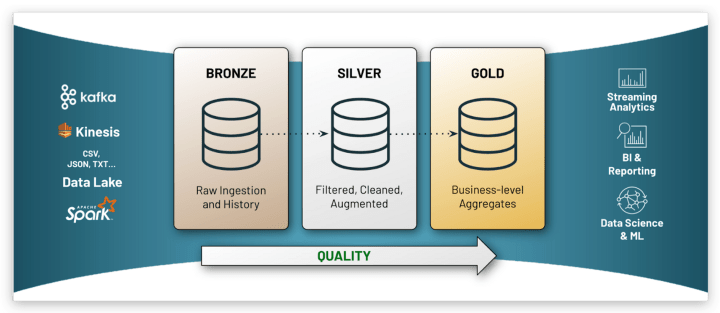
The medallion approach consists of 3 data layers. The terms bronze (raw), silver (validated), and gold (enriched) describe the quality of the data at each of these levels.

Let’s see the features and usage of each data layer of the architecture.

The Bronze Layer

This is where the journey starts! The data in various formats coming from different source systems, streaming data etc. are stored in a distributed file store which can hold vast data volumes. Normally the data in the bronze layer is not cleansed or processed (Data is in in their raw format). It can be timestamped or saved as it comes from sources.   

The Silver Layer

Though we have zillions of data in the bronze layer, most of it could be just garbage and not worthy enough for any analytical tasks. When transferring data to the silver layer, transformation rules are applied to cleanse the data, remove null values, and join with lookup tables. The cleansed and validated data in the silver layer can be used for ad-hoc reporting, sophisticated analytics and even for machine learning model training.  

The Gold Layer

As the name implies, this is the most valuable portion or the form of data in the organisation. This layer is accountable for aggregating data from the silver layer for business use. Since the data is enriched with business logic principles, data in the gold layer is mostly used in BI reporting and analytical tasks. Data analysts, data scientists and business analysts highly rely on the data available in the gold layer.

Storing the data with a medallion architecture ensure the data quality and its transparency. Medallion architecture is mainly promoted by Databricks, but can use as a blueprint for structuring Lakehouse in other platforms too.

What’s your choice for storing big data? Sticking with data lake or moving to Lakehouse?

References:

https://learn.microsoft.com/en-us/azure/databricks/lakehouse/medallion

https://www.databricks.com/blog/2020/01/30/what-is-a-data-lakehouse.html

Lambda Architecture & Cortana Intelligence Suite solutions

Data processing has become the key part of modern applications. Not only processing the data, but also visualizing data in a meaningful way is vital for making business decisions in an enterprise application.

With the rise of massive data storages and the speed of data generation, effective data processing architectural patterns came into industrial standards.

In the era of big data processing where data generated in high volume, variety, velocity, veracity and value; there are many architectural patterns that industrial applications are following for data processing. Lambda, Kappa and Zeta are some patterns used for real time big data processing.

Let’s take a look on how Lambda architecture can be adopted with the products and services comes with Microsoft Cortana Intelligence Suite.

What is Lambda Architecture?

2 - lambaLambda architecture is a data processing architecture designed to handle massive quantities of data by taking the advantage of both batch and stream processing methods. Nathan Marz introduced the term of Lambda Architecture (LA) for having a generic, scalable and fault tolerant data processing architecture.

LA contains different layers which handles data in various methodologies in the process of data processing.

The ability of processing both batch data and real-time data streams is one of the significant features of lambda architecture.

What is Cortana Intelligence Suite?

architectureCortana Intelligence Suite is the Microsoft’s umbrella branding for fully managed business intelligence, big data and advanced analytics offerings comes with Azure cloud which enables businesses to transform the data into intelligent actions. So “Cortana” is there in this name. Then what? Is this related to the smart assistant comes with Windows 10? As Microsoft says, Cortana symbolizes the contextual intelligence that the solutions hope to deliver across the entire suite.

Cortana Intelligence Suite comes with the following services that specially designed for following tasks.

  • Information Management
  • Big Data Stores
  • Machine Learning & Analytics
  • Intelligence
  • Dashboards & Visualizations

How Cortana Intelligence Suite aligns with Lambda architecture?

Cortana Intelligence Suite (CIS) comes with different solutions that can cater both batch data sources and data streams. It is a significant improvement where you combine traditional batch processing systems and data stream analysis systems.

For an example think of a system that indicates the fuel level, oil levels, car tire pressure etc. of a vehicle… The system too should have the ability to analyze the data fetching from the IoT sensors real time as well as do predictions using the stored batch of data. CIS comes handy with various approaches to design this system with lambda architecture.

Lambda

Usage of CIS tools for data processing

IoT sensors creates hundreds or maybe thousands of data points for a second. Handling such data streams and directing them to analytics flows can be done using Event Hubs(https://azure.microsoft.com/en-us/services/event-hubs/).  you can use Azure Stream Analytics to get data from EventHub into Azure Storage Blobs. Thereafter you can use Azure Data Factory (ADF) to copy data on a scheduled basis from Blobs to Azure Data Lake Store. ADF can act as the batch data source. For analyzing and to build predictive models on the batch data HDInsight & Azure Machine Learning is the option you can go with. Azure SQL data warehouse can be used to store the analyzed data and visualizing them using PowerBI can be done. This is the batch data processing line.

In the line of real time data analysis, you can push the data stream coming from event hub to a Stream Analytics service or for an azure machine learning model. Visualizing data with PowerBI would come handy too.

Apart from the above explained components comes for data processing task, Microsoft Cognitive services can be used for transforming the user interaction for more human side. For an example, Bot framework and LUIS can be used with Bing speech API to provide voice commands for applications. Cortana skills can be used for enabling your app to deal with Cortana assistant.