Unlocking the Power of Language with GPT-3

Yes. This is all about the hype of ChatGPT. It’s obvious that most of us are too obsessed with it and spending a lot of time with that amazing tool even as the regular search engine! (Is that a bye-bye google? 😀 )

I thought of discussing the usage of underlying mechanics of ChatGPT: Large Language Models (LLMs) and the applicability of these giants in intelligent application development.

What actually ChatGPT is?

ChatGPT is a conversational AI model developed by OpenAI. It uses the GPT-3 architecture, which is based on Transformer neural networks. GPT-3 is large language model with about 175 billion parameters. The model has been trained on a huge corpus of text data (about 45TB) to generate human-like responses to text inputs. Most of the data used in training is harvested from public internet. ChatGPT can perform a variety of language tasks such as answering questions, generating text, translating languages, and more.

ChatGPT is only a single use case of a massive research. The underlying power is the ANN architecture GPT-3. Let’s dig down step by step while discussing following pinpoints.

What are Large Language Models (LLMs)?

LLMs are deep learning algorithms that can recognize, summarize, translate, predict and generate text and other content based on knowledge gained from massive datasets. As the name suggests, these language models are trained with massive amounts of textual data using unsupervised learning. (Yes, there’s no data labelling involved with this). BLOOM from Hugging Face, ESMFold from Meta AI, Gato by DeepMind, BERT from Google, MT-NLG from Nvidia & Microsoft, GPT-3 from OpenAI are some of the LLMs in the AI space.

Large language models are among the most successful applications of transformer models. They aren’t just for teaching machines human languages, but for understanding proteins, writing software code and much more.

What are Transformers?

Encoder decoder architecture
The  encoder-decoder structure of the Transformer architecture
Taken from “Attention Is All You Need

Transformers? Are we going to talk about bumblebee here? Actually not!

Transformers are a type of neural network architecture (similar as Convolutional Neural Networks, Recurrent Neural Networks etc.) designed for processing sequential data such as text, speech, or time-series data. They were introduced in the 2017 research paper “Attention is All You Need“. Transformers use self-attention mechanisms to process the input sequence and compute a weighted sum of the features at each position, allowing the model to efficiently process sequences of varying length and capture long-range dependencies. They have been successful in many natural language processing tasks such as machine translation and have become a popular choice in recent years.

For a deep learning enthusiast this may sound familiar with the RNN architecture which are mostly used for learning sequential tasks. Unless the RNNs, transformers are capable of capturing long term dependencies which make them so capable of complex natural language processing tasks.

GPT stands for “Generative Pre-trained Transformer”. As the name implies it’s built with the blessing of transformers.

Alright… now GPT-3 is the hero here! So, what’s cool about GPT-3?

  • GPT-3 is one successful innovation in the LLMs (It’s not the only LLM in the world)
  • GPT-3 model itself has no knowledge; its strength lies in its ability to predict the subsequent word(s) in a sequence. It is not intended to store or recall factual information.
  • As such the model itself has no knowledge, it is just good at predicting the next word(s) in the sequence. It is not designed to store or retrieve facts.
  • It’s a pretrained machine learning model. You cannot download or retrain the model since it’s massive! (fine-tuning with our own data is possible).
  • GPT-3 is having a closed-API access which you need an API key to access.
  • GPT-3 is good mostly for English language tasks.
  • A bit of downside: the outputs can be biased and abusive – since it’s learning from the data fetched from public internet.

If you are really interested in learning the science behind GPT-3 I would recommend to take a look on the paper : Language Models are Few-Shot Learners

What’s OpenAI?

The 2015 founded research organisation OpenAI is the creators of GPT-3 architecture. GPT-3 is not the only interesting innovation from OpenAI. If you have seen AI generated arts which are created from a natural language phrases as the input, it’s most probably from DALL-E 2 neural network which is also from OpenAI.

OpenAI is having there set of APIs, which can be easily adapted for developers in their intelligent application development tasks.

Check the OpenAI APIs here: https://beta.openai.com/overview    

What can be the use cases of GPT-3?

We all know ChatGPT is ground-breaking. Our focus should be exploring the approaches which we can use its underlying architecture (GPT-3) in application development.

Since the beginning of the deep neural networks, there have been lot of research and innovation in the computer vision space. The networks like ResNet were ground-breaking and even surpass the human accuracy level in tasks like image classification with ImageNet dataset. We were getting the advantage of having pre-trained state-of-the-art networks for computer vision tasks without bothering on large training datasets.

The LLMs like GPT-3 is addressing the gap of the lack of such networks in natural language analysis tasks. Simply it’s a massive pre-trained knowledge base that can understand language.

There are many interesting use cases of GPT-3 as a language model in use cases including but not limited to:

  • Dynamic chatbots for customer service use cases which provide more human-like interaction with users.
  • Intelligent document management by generating smart tagging/ paraphrasing, summarizing textual documents.
  • Content generation for websites, new articles, educational materials etc.
  • Advance textual classification tasks
  • Sentiment analysis
  • Semantic search capabilities which provide natural language query capability.
  • Text translation, keyword identification etc.
  • Programming code generation and code optimisation

Since the GPT-3 can be fine-tuned with a given set of training data, the possibilities are limitless with the natural language understanding capability it is having. You can be creative and come up with the next big idea which improves the productivity of your business.

What is Azure OpenAI?

Azure OpenAI is a collaboration between Microsoft’s Azure cloud platform and OpenAI, aimed at providing cloud-based access to OpenAI’s cutting-edge AI models and tools. The partnership provides a seamless platform for developers and organizations to build, deploy, and scale AI applications and services, leveraging the computing resources and technology of the Azure cloud.

Users can access the service through REST APIs, Python SDK or through the Azure OpenAI Service Studio, which is the web-based interface dedicated for OpenAI services.

In enterprise application development scenarios, using OpenAI services through Azure makes it much easier for integration.

Azure OpenAI opened for general availability very recently and I’m pretty sure there’ll be vast improvements in the coming days with the product.

Let’s keep our eyes open and start innovating on ways which we can use this super-power wisely.

What’s Best for Me? – 5 Data Analytics Service Selection Scenarios Explained

With the extensive usage of cloud-based technologies to perform machine learning and data science related experiments, choosing the right toolset/ platform to perform the operations is a key part for the project success.

Since selecting the perfect toolset for our ML workloads maybe bit tricky, I thought of sharing my thoughts on that by getting a couple of generic use cases. Please keep in mind that the use cases I have chosen and the decisions I’m suggesting are totally my own view on the scenarios and this may differ based on different factors (amount of data, time frame, allocated budget, ability of the developer etc.) you have with your project. Plus, the suggestions I’m pointing out here are from the services comes with Microsoft Azure cloud. This maybe the easily adjusted for other cloud providers too.

Scenario 1:

We are a medium scale micro financing company having our data stored on Microsoft Azure. We have a plan to build a datalake and use that for analytical and reporting tasks. We have a diverse data team with abilities in python, Scala and SQL (most of the data engineers are only familiar with SQL). We need to build a couple of machine learning models for predictions. What would be the best platform to go forward with? Azure Databricks or Azure ML Studio?

Suggestion: Azure Databricks

Reasons:

  • Databricks is more flexible in ETL and datalake related data operations comparing to AzureML Studio.
  • You can perform data curation and machine learning within a single product with Azure Databricks.
  • Databricks can connect with Azure Data Factory pipelines to handle data flow and data curation tasks within the datalake.
  • Since the data engineers are more familiar with SQL, they’ll easily adapt with SparkSQL on Databricks.
  • Data team can develop their machine learning experiments with any language of their choice with Databricks notebooks.
  • Databricks notebooks can be used for analytical and reporting tasks even with a combination of PowerBI.
  • Given that, the company is planning for building a datalake, Databricks is far more flexible in ETL tasks. You can use Azure Data Factory pipelines with Databricks to control the data flow of the datalake.

Scenario 2:

I’m a computer science undergrad. I’m doing a software project to predict several types of wildflowers by capturing images from a mobile phone. I’m planning to build my computer vision model using TensorFlow and Keras and expose the service as a REST API.  Since I’m not having the infrastructure to train the ML models, I’m planning to use Azure for that. Which tool on Azure should I choose?

Suggestion: Azure ML Studio

Reasons:

  • AzureML provides a complete toolset to train, test and deploy a deep learning model using any open-source framework of your choice.
  • You can use the GPU training clusters on AzureML to train your models.
  • It’s easy to log your model training and experiments using AzureML python SDK.
  • AzureML gives you the ability for model management and exposing the trained model as a REST API.
  • Small learning curve and adaptability.

Scenario 3:

I’m the CEO of a retail company. I’m not having a vast experience with computing or programming but having a background in maths and statistics. I have a plan to use machine learning to perform predictive analysis with the data currently having in my company. Most of the data are still in excel! Someone suggested me to use Azure. What product on Azure should I choose?

Suggestion: Azure ML Studio

Reasons:

  • For a beginner in machine learning and data science, Azure ML Studio is a good start.
  • AzureML Studio provides no-code environments (Azure ML designer and AutoML) to develop ML models.   
  • Since, you are mostly in the experimental stage and not going for using bigger datasets, using Databricks would be an overkill.
  • You can easily import your prevailing data and start experimenting and playing around with them without any local environmental setup.

Scenario 4:

I’m the IT manager of a large enterprise who are heavily relying on data assets with our decision-making process. We have to run iterative jobs daily to retrieve data from different external sources and internal systems. Currently we have an on-prem SQL database acting as the data warehouse.  Company has decided to go for cloud. Can Azure serve our needs?   

Suggestion: Yes. Azure can serve your need with different tools in the data & AI domain.

Reasons:

  • You can use Azure Synapse Analytics or Azure Data Factory to build data pipelines and perform ETL operations.
  • The local data warehouse can be easily migrated to Azure cloud.
  • You can use Azure Databricks in-order to perform analytics tasks.
  • Since the enterprise in large and scaling, using Databricks would be better with its Spark based computation abilities.

Scenario 5:

We are an agricultural company growing forward with adopting modern Agri-tech into the business. We collect numerous data values from our plantations and store them in our cloud databases. We have a set of data scientists working on data modelling and building predictive models related to crop fertilizing and harvesting. They are currently using their own laptops to perform analysis and it’s troublesome with the data amount, platform configurations and security. Will Azure ML comes handy in our case?

Suggestion: Yes. Azure ML Studio would be a good choice.

Reasons:

  • AzureML can be easily adaptable as an analytical platform.
  • The cloud databases can be connected to AzureML, and data scientists can straight-up start working on the data assets.
  • AzureML is relatively cheap comparing to Databricks (Given the data amount is manageable in a single computer.)
  • It’s easy to perform prototyping of models using AutoML/ AzureML Designer and then implement the models within a short time frame.  

Generally, these are the factors I would keep in mind when selecting the services for ML/ data related implementations on Azure.

  • Azure ML studio is good when you are training with a limited data, though Azure ML provides training clusters, the data distribution among the nodes is to be handled in the code.
  • AzureML Studio comes handy in prototyping with AzureML designer and Automated ML.
  • Azure Databricks with its RDDs is designed to handle data distributed on multiple nodes which is advantageous when your you have big datasets.
  • When your data size is small and can fit in a scaled up single machine/ you are using a pandas dataframe, then use of Azure Databricks is an overkill.
  • Services like Azure Data Factory and Datalake storage can be easily interconnected for building  

Let me know your thoughts on these scenarios as well. Add your queries in the comments too. I’ll try my best to provide my suggestions for those use cases.

Different Approaches to Perform Machine Learning Experiments on Azure

We have discussed a lot about Azure Machine Learning Studio; the one-stop portal for all ML related workloads on Azure cloud. AzureML Studio provides different approaches to work on the machine learning experiments based on needs, resources and constraints you have.  Selecting the plan to attack is completely your choice.  

We all have our own way of performing machine learning experiments. While some prefer working on Jupyter notebooks, some are more into less code environments. Being able to onboard data scientists with their familiar development environment without a big learning overhead is one of the main advantages of AzureML.

In this article, let’s have a discussion on different methods available in AzureML studio and their usage in practical scenarios. We may discuss pros and cons of each approach as well.

Please keep in mind that, these are my personal thoughts based on the experiences I had with ML experiments and this may change in different scenarios.

Automated ML

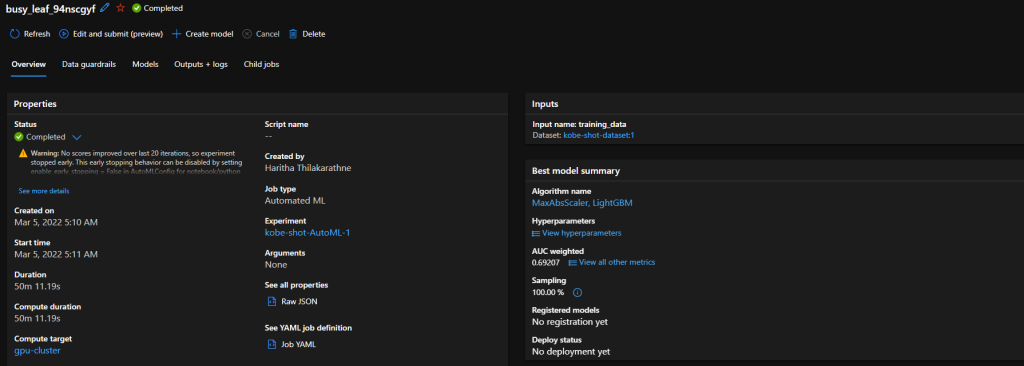
Summary of an Automated ML experiment

As the name implies, this is all automated. Automated ML is the easiest way of producing a predictive model just in few minutes. You don’t need to have any coding experience to use Automated ML. Just need to have an idea on machine learning basics and an understanding on the problem you going to solve with ML.

The process is pretty straight forward. You can start with selecting the dataset you want to use for ML model training and specify the ML task you want to perform. (Right now, it supports classification, regression, time series forecasting. Computer vision and NLP tasks are in preview). Then you can specify the algorithms you want to test it with and other optional parameters. Azure does all the hard work for you and provides a deployment ready model which can be exposed as a REST API.

Pros:

  • Zero code process.
  • Easy to use and well suited for fast prototyping.
  • Eliminate the environment setup step in ML model development
  • Limited knowledge on machine learning is needed to get a production viable result.  

Cons:

  • Limited machine learning capabilities.
  • Right now, only works with supervised learning problem scenarios.
  • Works well with relational data, computer vision and NLP are still in preview.
  • There’s no way of using custom machine learning algorithms in the process.

Azure ML Designer

Azure ML Designer

Azure ML Designer is an upgraded version of the pretty old Azure ML Studio drag and drop version. Azure ML Designer is having a similar drag and drop interface for building machine leaning experiment pipelines. You have a set of prebuilt components which you can connect together in a flowchart like manner to build machine learning experiments. You have the ability to use SQL queries or python/ R scripts if you want in the process too. After training a viable ML model, you can deploy it as a web service with just few clicks.

I personally prefer this for prototyping. Plus, I see a lot f potential on Azure ML designer in educational purposes. It’s really easy to visualize the ML process through the designer pipelines and it increases the interpretability of the operation.

Pros:

  • Zero code/ Less code environment
  • Easy to use graphical interface
  • No need to worry on development/ training environment configurations
  • Having the ability to expand the capabilities with python/ R scripts
  • Easy model deployment

Cons:

  • Less flexibility for complex ML model development.
  • Less support for deep learning workloads.
  • Code versioning should handle separately.

Azure ML notebooks

Performing data visualization on AzureML notebooks

This maybe the most favourite feature on Azure ML for data scientists. I know Jupyter notebooks are like bread and butter for data scientists. Azure ML offers a fully managed notebook experience for them without giving them the hassle of setting up the dev environment on local computers. You just have to connect the notebook with a compute instance and it allows you to do your model development and training on cloud in the same way you did on a local compute or elsewhere on notebooks.

I would recommend this as the to-go option for most of the machine learning experiments since it’s really easy to spin up a notebook instance and get the job done. Most of the ML related libraries are pre-installed on the compute instance and you even have the flexibility to install 3rd party packaged you need through conda or pip.

Pros:

  • Familiar notebook experience on cloud.
  • Option to use different python kernels.
  • No need to worry about dev environment setup on local compute.
  • Can use the powerful compute resources on Azure for model training.
  • Flexibility to install required libraries through package managers.

Cons:

  • Comes with a price for computation.
  • No direct support for spark workloads.
  • Code version control should manage separately.

Developing on local and connect to AzureML service through AML Python SDK.

This is the option I would suggest for more advanced users. Think of a scenario where you have a deep learning based computer vision experiment to run on Azure with a complex code base. If this is the case, I would definitely use AzureML python SDK and connect my prevailing code base with the AzureML service.

In this approach, your code base sits on your local computer and you are using Azure for model training, deployment and monitoring purposes. You have the total flexibility of using the power of cloud for computations as well as the flexibility of using local machine for development.

Pros:

  • Total flexibility in performing machine learning experiments with our comfortable dev tools.
  • AzureML python SDK is an open-source library.
  • Code version controlling can be handled easily.
  • Whole ML process can be managed using scripts. (Easy for automation)

Cons:

  • Setting up the local development environment may take some effort.
  • Some features are still in experimental stage.

Choosing the most convenient approach for your ML experiment is totally based on the need and resources you have. Before getting into the big picture, start small. Start with a prototype, then a workable MVP, gradually you can move forward with expanding it with complex machine learning approaches.

What’s your most preferred way of model development from these options? Please mention in the comments.

Cheers!

MLOps : Let’s start plumbing ML experiments!

What’s all this hype on MLOps? What’s the difference between machine learning and MLOps? Is MLOps essential? Why we need MLOps? Through this article series we going to start a discussion on MLOps to get a good start with the upcoming trend. The first post is not going to go deep with technicalities, but going to cover up essential concepts behind MLOps.

What is MLOps?

As the name implies, it is obviously having some connection with DevOps. So, will see what DevOps is first.

“A compound of development (Dev) and operations (Ops), DevOps is the union of people, process, and technology to continually provide value to customers.”

Microsoft Docs

This is the formal definition of DevOps. In the simpler terms, DevOps is the approach of streamlining application development life cycle of software development process. It ensures the quality engineering and security of the product while making sure the team collaboration and coordination is managed effectively.

Imagine you are a junior level developer in a software development company who develops a mission critical system for a surveillance application. DevOps process make sure each and every code line you write is tracked, managed and integrated to the final product reliably. It doesn’t stop just by managing the code base. It involves managing all development life cycle steps including the final deployment and monitoring of the final product iteratively too.

That’s DevOps. Machine Learning Operations (MLOps) is influenced by DevOps principles and practices to increase the efficiency of machine learning workflows. Simply, it’s the way of managing ML workflows in a streamlines way to ensure quality, reliability, and interpretability of machine learning experiments.

Is MLOps essential?

We have been playing around with machine learning experiments with different tools, frameworks and techniques for a while. To be honest, most of our experiments didn’t end up in production environments :D. But, that’s the ultimate goal of predictive modeling.

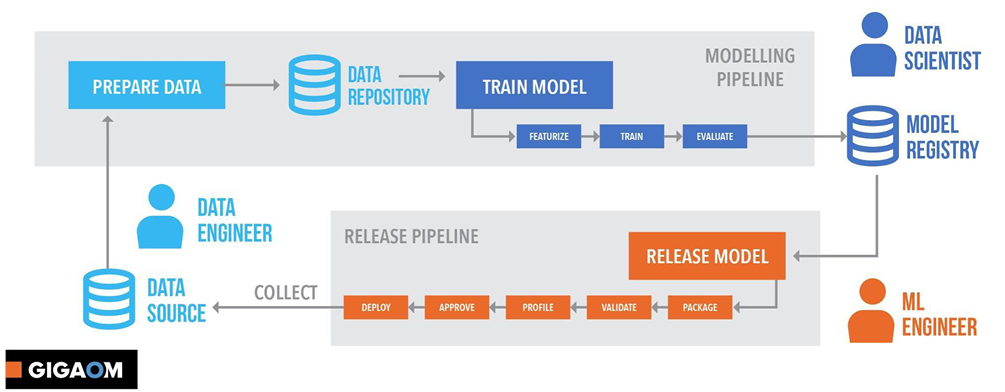
Machine Learning experiment is an iterative process
Source : https://azure.microsoft.com/en-au/resources/gigaom-delivering-on-the-vision-of-mlops/

Building a machine learning model and deploying it is not a single step process. It starts with data collection and goes in an iterative life cycle till monitoring the deployed model in the production environment. MLOps approaches and concepts streamline these steps and interconnect them together.

Answer is Yes! We definitely need MLOps!

Why we need MLOps?

As I said earlier, MLOps interconnect the steps in ML life cycle and streamline the process.

I grabbed these points from Microsoft docs. As it implies, these are the goals of MLOps.

  • Faster experimentation and development of models

Good MLOps practices leads for more code and component reusability which leads for faster experiments and model development. For an example, without having separate training loops or data loading components for each experiment, we can reuse an abstract set of methods for those tasks and connect them with a machine learning pipeline for running different experiment configurations. That’s make the life easy of the developer a lot!

I do lot of experiments with computer vision. In my case, I usually have a set of abstract python methods that can be used for model training and model evaluation. When performing different experiments, I pass the required parameters to the pipeline and reuse the methods which makes the life easy with less coding hassle.    

  • Faster deployment of models into production

Machine learning model deployment is always a tricky part. Managing the endpoints and making sure the deployment environment is having all the required platform dependencies maybe hard to keep track with manual processes. A streamlines MLOps pipeline helps to manage deployments by enabling us to choose which trained model should go for production etc. by keeping track of a model registry and deployment slots.

  • Quality assurance and end-to-end lineage tracking

Maintaining good coding practices, version controlling, dataset versioning etc. ensures the quality of your experiments. Good MLOps practices helps you to find out the points where errors are occurring easily rather than breaking down the whole process. Will say your trained model is not performing well with the testing data after sometime from model deployment. That might be caused by data drift happened with time. Correctly configured MLOps pipeline can track such changes in the inference data periodically and make sure to notify such incidents.

  • Trustworthiness and ethical AI

This is one of the most important use cases of MLOps. It’s crucial to have transparency in machine learning experiments. The developer/ data scientist should be able to interpret each and every decision they took while performing the experiment. Since handling data is the key component of ML model, there should be ways to maintain correct security measures in experiments too. MLOps pipelines ensure these ethical AI principles are met by streamlining the process with a defined set of procedures.

How we gonna do this?

Now we all know MLOps is crucial. Not just having set of python scripts sitting in a notebook it’s all about interconnecting all the steps in a machine learning experiments together in an iterative process pipeline. There are many methods and approaches to go forward with. Some sits on-prem while most of the solutions are having hybrid approach with the cloud. I usually use lot of Azure services in my experiments and Azure machine learning Studio provides a one-stop workbench to handle all these MLOps workloads which comes pretty handy. Let’s start with a real-world scenario and see how we can use Azure Machine Learning Studio in MLOps process to streamline our machine learning experiments.

“Stay Hungry Stay Foolish” – Let’s Learn Machine Learning without Code!

“Stay Hungry Stay Foolish”

Steve Jobs

This famous quote of Steve Jobs is one of the most precious quotes I always keep in my mind. Stepping into the IT industry 11 years back as a teenager, I was always eagerly waiting to push myself beyond the barriers and keep trying new things. That hunger led me to explore Artificial Intelligence, undoubtably the most used buzz word in today’s industry. I always make sure to keep myself foolish and open to learn new things.   

When I started exploring data science and related technologies 6 years ago, almost all the new things I experimented in the work life were self-taught from online resources. Even today I really enjoy going through documentations on different technologies and making myself familiar with those.

In the AI space, Microsoft Azure is a dominant player with their vast variety of tools and services. Being working with different AI related tools for years, I’m super thrilled to see the advancements on the Azure data & AI space. When the MVP cloud skills challenge was launched, I had no hesitation to go forward with Data & AI path, since I needed to sharpen up my skills and update myself with the new capabilities Azure AI is providing.

Azure AI is equipped with tools and services for anyone who’s interested in AI no matter in which expertise level the person is in. You can easily use Azure Cognitive services to add AI capabilities for your application by just calling for a REST API. If you want develop an advance machine learning/ deep learning experiment, Azure AI allows you to use your favorite open-source tools and frameworks with and adapt the power of cloud for your development.

What I actually learnt?

The challenge consists learning modules which covers most of the prominent parts in Azure AI domain including Azure machine learning, Azure cognitive services, Azure cognitive search and Bot framework. It has been a long time since I built bots. So, working with the new capabilities and functions of bot framework was a pretty good experience. In addition to that, Azure cognitive search is one of the services I’ve least used in my developments and I always wanted to give it a try. With the simple but well managed learning modules gave me a perfect star to sketch my first cognitive search application.

Here comes the most interesting part!

One of the most common questions I get when doing sessions in the community is “do we actually need to know coding to perform machine learning experiments?”

With no hesitation I say yes because Azure machine learning is offering two powerful tools for zero-code machine learning experiments. Automated machine learning supports training supervised machine learning models for classification, regression and time series forecasting. You can create and publish a machine learning experiment as a REST API with just few clicks!

Azure Machine Learning Designer provides you a simple drag and drop interface where you can create machine learning pipelines and publish those as REST endpoints. If you want advance functionalities, it allows you to add python or R code snippets inside the pipelines too.  

Machine Learning with Zero-code learning collection

I know you are super eager to learn on this zero-code machine learning development tools. Check out the Microsoft Learn collection I created specifically focusing on these two tools. Don’t forget to share your learning experience with me.

Click here for the Machine Learning with Zero-code learning collection!

Happy Learning!  

10 Tips for Designing & Developing Computer Vision Projects

Computer vision based applications have become one of the most popular research areas as well as have gained lot of interest in different industrial domains. Popularity and the advancements of deep learning have given a boost for the hype of computer vision.

Being a researcher focused on computer vision based applications for nearly 3 years, Here are some tips I’d give for a developer who’s stepping into a computer vision related experiment/ deployment.

Before going further into the discussion, you may need to get an idea on the difference between traditional computer vision approaches and deep learning based approaches. Here’s a quick overview on that.

01. Do we really have to use deep learning based computer vision approaches to solve this?

This is the very first thing to concern! When you see a problem from the scratch, you may think applying deep learning for this is the survivor. It’s not true in some cases. You may be able to solve the problem using traditional line detection filters etc. easily without wasting the time and energy in training a deep learning model to solve the task. Observe the problem thoroughly and get the decision to move forward or not.

02. Analyze the input data and the desired output

To be obvious, deep learning based computer vision models get images or videos as its input modalities. Before starting the project implementations, we should consider following factors of the input data we have.

Size of the data –

Since DL models need a huge amount of data (in most of the cases) for training without getting the models overfitted we need to make sure we have a good amount of data in hand for training. In this case we can’t specify exact numbers. I’d say more the better!

Quality of the data –

Some image inputs or the video streams we get are blurred and not covering the most important features we need to build the models. Getting images/ videos in higher resolution is always better. When considering the quality of the data it’s better to take a look on the factors like class imbalance if it’s a classification problem.

Similarity of training data and data inputs in the inference time –

I’ve seen cases where data model is getting in the inference time is very different than the data used in the training (For an example the model is trained using cat images from cartoons and it’s getting real life cat images in the inference time.) If it’s not a model which is specifically designed for domain adaptation, you should NEVER do this mistake.

03. Building from the scratch? Is it necessary?

As I said previously, computer vision is one of the most widely researched areas in deep learning. So that, you are having the privilege of using pre-built models as well as online services to perform your computer vision workloads.

Services such as Azure cognitive services, Google vision APIs etc. provides pre-built web APIs which you can directly use for many vision related tasks. Starting from an OCR task of reading a text in a scanned document, there are APIs which can identify human faces and their emotions even. No need to build from the scratch. You can just use the service as a web service in your application.

Even going a step forward from the pre-built services Microsoft Azure cognitive services offer a custom vision service where you can train your own image classification models with your own data. This may come handy in most of the practical applications where you don’t need to spend time on building the model or configuring the training environment.

04. Building from scratch? Is it REALLY necessary?

Yp! Again, a decision to take. If your problem cannot be addressed from the pre-built computer vision services available online, the option you have to go forward is building a deep learning model and training it using your own data. When it comes to model development one of the very big mistakes we do is neglecting the prevailing models built by researchers for various purposes.

I’m pretty sure most of the computer vision tasks that you have is falling under famous computer vision areas such as image classification, action recognition in videos, human pose detection, human/ object tracking etc. There are many pre-built methods which has been achieved state-of-the-art accuracy in solving these problems and benchmarked with most of the publicly available big datasets. For an example, ResNet models are specifically designed for image classification and shown the best accuracy on ImageNet dataset. You can easily use these models (Most of these models are available in model zoos of popular deep learning frameworks) and adapt their last layers for your needs and get higher accuracies rather than building your own model from the scratch.

Papers with code is a great place to search for prevailing models on various computer vision tasks.

I recently came across this openMMLab repositories which comes pretty handy in such tasks. (Mostly for video analysis stuff)

05. Use the correct method

When building the models, make sure you follow the correct path which matches with your data input. For an example if you only have few training images to train your classification model, you may need to look on areas like few-shot learning to train your model. Tricks such as adding batch normalization, using correct loss functions, adding more input modalities, using learning rate schedulers, transfer learning will surely increase your model accuracy.

06. Data augmentation is a suvivor!

More data the better! Always take a look on sensible data augmentation methods to make sure your model is not overfitted for training data. Always visualize your data inputs before using that for model training to make sure your data augmentations are making sense.  

07. Model training should not be a nightmare

This is the most time-consuming part in developing computer vision models. We all know training deep learning models needs a lot of computation power. Make sure you have enough computation power to train your models. It’ll be a nightmare to train an image classifier which is having 100,000 images just using your CPU! Make sure you have a good enough GPUs for performing the computations and configured them correctly for training models.  

08. Model inference time should not be years!

Model inferencing the least concerned portion in model development. Though it is the most vital part since this is where the outcome is shown for the outsider. Sometimes, your trained model may take a lot of time for inferencing which may make the model useless in a real-world application. Think of a human detection system you implemented taking 1-2 minutes to identify a human who’s accessing a secured location…. There’s no use of a such system since that doesn’t meet the need of real-time surveillance. Always make sure to develop the simplest model that gives the best accuracy. Sometimes you may have to compromise few digits from the accuracy numbers to increase the model efficiency. That’s totally fine in a real-world application. Before pushing the model into production, take a look on converting the models to ONNX or model pruning. It’ll help you to deploy efficient models.

09. Take a look on your deployment target

This directly connects with the facts we discussed in the model inference time. We don’t have the luxury of having high end machines powered with GPUs in all deployment locations. Or having high powered cloud services. Sometimes out deployment target may be a IoT device. So that make sure you design a light weight model which even provides a good performance by consuming less resources.     

10. Privacy concerns

Last but not least, we may have to look on privacy concerns. Since we are dealing with image and video data which may contains lot of personal informaiton of the people, we need to make sure we are followiong the privacy guidelines and making sure the data we use for model training is having enough security clearance to do such tasks.

Bit lengthy… but hope you got some clues before getting into your next computer vision project. Happy coding 😊

Connecting Azure SQL server with Azure Machine Learning

Accessing data in different data sources is one of the main tasks in machine learning model development life cycle. Let’s discuss one of the most common data accessing scenarios.

Scenario :

We have to set of relational data points stored in a Azure SQL server to develop a machine learning model using Azure Machine Learning. Let’s see how to leverage data stored in an Azure SQL database in an Azure Machine Learning experiment.

The process contains three main steps.

  1. Set access permissions of Azure SQL database
  2. Connect Azure SQL database to an Azure ML datastore
  3. Register the data in datastore as an Azure ML dataset.

1. Set access permissions of Azure SQL database

Allow Azure services and resources to access this server

By default Azure SQL databases are protected with a firewall which limits outside access for data. Since we going to provide access for the traffic from Ips belongs to Azure resources and services, make sure you allow Azure services to access your SQL server.

2. Connect Azure SQL database to an Azure ML datastore

Azure ML datastores can be defined as the abstraction of data sources for the ML workspace or as the interconnection between the data resource and AzureML workspace.

Go to your Azure Machine Learning Studio (ml.azure.com) and click ‘New datastore’. Provide a datastore name and select ‘Azure SQL database’ as the datastore type. Make sure to authenticate the access with Azure SQL server’s user ID and the password.

Register a new datastore

3. Register the data in datastore as an Azure ML dataset.

AzureML supports two types of datasets (Take a look here to get an overview on the difference between those). Since we are dealing with a set of relational data, Tabular dataset is the option we have to use for creating the dataset.

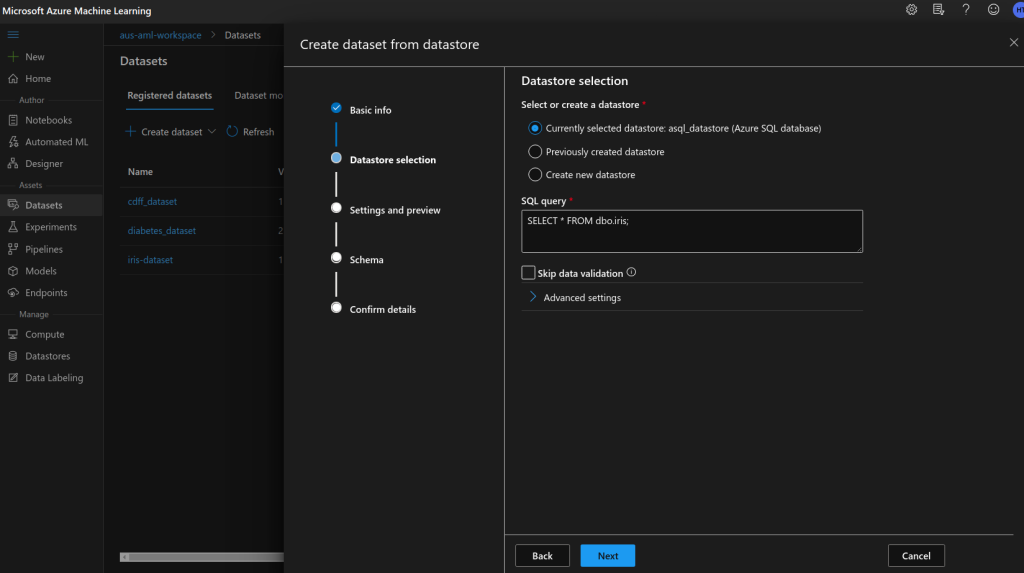
Create dataset from datastore

Select ‘Create dataset’ from ‘Datasets’ tab on AML Studio and prmopt to ‘From datastore’ option.

Select the datastore we created in the previous step which establish the connection between AML workspace and the data source.

Provide the required SQL query to select the required data from SQL server. Make sure to validate the data before configuring the schema.

Preview dataset

All done! Now you have the access to the data in your Azure SQL database from AzureML workspace. You can easily refer this in your experiments.

Validate dataset

In the cases where your database is getting updated time to time, what you have to do is refreshing the dataset to fetch the newest data points specified by the SQL query.

Different Computation Options on Azure Machine Learning

In a later article we discussed on different data storage methods we can use with Azure Machine learning. In this article am gonna briefly discuss different computation options we have with Azure ML.

Since computation power is one of the key advantage we get from cloud based machine learning, choosing correct computation resource for our machine learning experiments is important.

AzureML offers 4 main compute types.

01. Compute instances –

If you don’t wanna spend the time in setting up your local computer for doing the ML experiments or you wanna leverage GPUs or powerful CPUs for doing your experiments, Azure Compute instances offer fully managed virtual machines loaded with most of the essential frameworks /libraries for performing machine learning and data science experiments. When you using AzureML notebooks (jupyter notebook instance attached for AzureML), compute instance is the place where the jupyter notebook is running.

Different methods can be used to access compute instances

You can access the compute instances using different methods. Accessing through Jupyter notebooks and JupyterLab is the all time favourite of most of the data scientists. If you are a R folk, you can use Rstudio with the compute instances. Accessing the compute instance through SSH is really useful (you may have to enable SSH access when creating the compute instance) in occasions where you have to install custom packages and such for the compute instance. (The machine is ubuntu based and you can use all bash scripts there!)

Basically compute instance can be defined as a virtual machine fully loaded with data science and machine learning essentials which you can use right out of the box.

02. Compute clusters –

Compute clusters are different from compute instances with their ability of having one or more compute nodes. These compute nodes can be created with our desired hardware configurations.

Why having more than one node? That comes with the ability of using parallel processing for computations. If you are going do to hyperparameter tuning/ GPU based complex computations/ several machine learning runs at once you may have to create a compute cluster.

If you are running Automated Machine Learning expriment with AzureML, you must have a compute cluster to perform computations.

When selecting the node configurations, you can either go with CPU based nodes or GPU based nodes. GPU based nodes (NC type etc.) is bit pricy. If you are not using GPU based computing, don’t waste your dollars by just creating a compute cluster with some fancy configs.

One other key setting is ‘Virtual machine priority’. If you are ok with pushing your experiment to the cloud and get the result without a hurry, you can go with low priority nodes, which will save you a lot of dollars rather than using dedicated VMs. No harm is gonna happen for the experimentation accuracy and such.

03. Inference clusters –

There are two options to deploy Azure machine learning web services as REST endpoints. 1) Use ACI (Azure Container Instances) 2) Use AKS (Azure Kubernetes Service)

Deploying the REST web service on ACI is good for testing and development uses and AKS would be the to-go for production level large deployments. You can configure the AKS cluster according to your need through AzureML as well as from the Azure portal. These AKS clusters are pretty much similar for AKS clusters you worked in any other Azure based deployments.

04. Attached compute –

Azure machine learning is not limited for doing computations on compute clusters. You can attach Azure Databricks, Data Lake Analytics, HDInsight or a prevailing VM as a compute for your workspace. Keep in your mind that Azure machine learning only supports virtual machines running Ubuntu. These compute targets will not be managed by Azure Machine Learning itself. So you may have to perform some additional steps to make sure they are compatible with your experiments.

Choosing the correct compute resource is a key component in the success of developing machine learning experiments. On the other hand, bad computation choices may leave you with huge Azure bills! 😀

There’s no hard bound rules on selecting different compute options for your machine learning life cycle. Just make sure you use the right tool at the right time.

AzureML Python SDK – Installation & Configuration

In the last blog post, we discussed on developing a machine learning classifier with Azure machine learning service. As mentioned there, we going to utilize the familiar development tools and frameworks for model development.

Key areas of the SDK include:

  • Explore, prepare and manage the lifecycle of your datasets used in machine learning experiments.
  • Manage cloud resources for monitoring, logging, and organizing your machine learning experiments.
  • Train models either locally or by using cloud resources, including GPU-accelerated model training.
  • Use automated machine learning, which accepts configuration parameters and training data. It automatically iterates through algorithms and hyperparameter settings to find the best model for running predictions.
  • Deploy web services to convert your trained models into RESTful services that can be consumed in any application.

~ Ref : https://docs.microsoft.com/en-us/python/api/overview/azure/ml/?view=azure-ml-py

AzureML python SDK acts as the connector between all the resources on the cloud and the dev environment.

Installing Python SDK –

AzureML SDK can be easily installed for your local computer through pip. Refer this guide for the installation process. I’d suggest to go with default installation since it’s enough for the most of the operations we used in the experiment.  It’s a good idea to upgrade the SDK before running an experiment since the package is rapidly updating.

Download config file –

For connecting the AzureML workspace, we may need the Azure subscription ID, resource group which the workspace has been created and the workspace name. The easiest way to grab these details is downloading the config.json file from the Azure portal. Place this file inside the experiment directory.

Downloading config.json from Azure portal

Connect AzureML Workspace –

Connecting the AzureML workspace and and listing the resources can be done by using easy python syntaxes of AzureML SDK (A sample code is provided below). Refer Python SDK documentation to do modifications for the resources of the AML service.

#!pip install --upgrade azureml-sdk[notebooks]
import azureml.core
from azureml.core import Workspace
from azureml.core import ComputeTarget, Datastore, Dataset

print("Ready to use Azure ML", azureml.core.VERSION)
ws = Workspace.from_config()
print(ws.name, "loaded")

#View resources in the workspace 
print("Compute Targets:")
for compute_name in ws.compute_targets:
    compute = ws.compute_targets[compute_name]
    print("\t", compute.name, ":", compute.type)
    
print("Datastores:")
for datastore in ws.datastores:
    print("\t", datastore)
    
print("Datasets:")
for dataset in ws.datasets:
    print("\t", dataset)

print("Web Services:")
for webservice_name in ws.webservices:
    webservice = ws.webservices[webservice_name]
    print("\t", webservice.name)

In next blog article, will discuss the data loading and experiment creation.

Build a Machine Learning Classifier with Azure Machine Learning Service

Azure Machine Learning Service is becoming the one-stop place for managing all ML related workloads in Azure cloud. There are two main advantages of using Azure Machine Learning Service for your ML and data science experiments.

#1 – You can mange the whole machine learning workflow in a single environment. From data wrangling to machine learning service deployment, everything is managed on the cloud with its reliable, scalable and efficient services.

#2 – You can use your familiar open source toolset, languages and frameworks in model development. Being a ML engineer or a data scientist, you may be using python or R as your main development languages. Azure machine learning allows you to use any of those languages and frameworks to develop the experiments.

Pima Indians Diabetes Classification is one of the most famous machine learning experiments. It’s a binary classification problem which use a .CSV based tabular dataset as the input. I’ll walk you through the process I went through to perform my experiment.

Scenario:

  • Diabetes dataset is available as a .CSV file in your local file system.
  • I have to build a binary classifier trained with the dataset and deploy it as a web service with a REST endpoint.

Solution:

As shown in the diagram I used the services and tools in AMLS with my typical development environments to build up the solution.

  • Step 1: Since the experiment is going to build on Azure cloud, I have transferred my dataset into an Azure blob storage. I used Azure storage Explorer to upload the dataset into the cloud. (For better performance, make sure the dataset is in a storage blob in the same region where the AMLS experiment is)
  • Step 2: In order to access the data stored in the blob space, it’s registered inside AMLS as a datastore.
  • Step 3: AMLS supports two types of datasets. Since the .CSV file contains tabular data, it’s registered as a tabular dataset. (You can perform the basic statistical operations and visualizations after registering as a tabular dataset.)
  • Step 4: Now it’s the time for the real job. Since am more familiar with Python and sci-kit learn, I used those languages and libraries to develop my model. The whole coding part has been done on a Linux machine using my favorite VSCode IDE. 😉 You may wonder how I’m going to connect the code base on my local machine with the cloud… Here’s the place where AzureML python SDK comes to the rescue.
  • Step 5: I don’t have enough computation power to do the model training on my machine. So that, I use an Azure compute cluster to perform the computation. (In my experiment I did hyperparameter tuning to select the best parameters. Using the compute cluster allowed me to perform parallel training)
  • Step 6: After model training and getting the desired inference accuracy, I had the need of exposing the binary classification model as a web service. For that, I used Azure Container Instance (ACI) since this is going to be a small testing experiment. (I may have to go for an Azure Kubernetes Services (AKS) if I wanna go for global massive deployment)

Yp! It’s just a simple 6 step process. Complex? Don’t worry, I’m going to walk you through the whole process assisted with the code snippets in the upcoming blog posts. Stay tuned. Let’s start a real experiment with Azure Machine Learning Service.