Microsoft Project tips & tricks – Project Management Tools Part 03

Critical path memeHere we go! In the last post we discussed how to get started with Microsoft Project, building a work break down structure, Gantt charts, and project calendar kind of stuffs. So in this post we are going to discuss further about some of the essential functionalities in MS Project that you can use for project management.

Assigning Resources to Tasks –

You can use the Resource Sheet in Microsoft Project (Task -> View -> Resource Sheet) to create a list of the people, equipment, and material resources that make up your team and carry out the project tasks. Your resource list will consist of work resources or material resources.

Resource Sheet

Resource Sheet

Work resources are people or equipment. Work resources like people may have hourly rates that we should pay. Sometimes for the equipment we using, we’ve to pay a rental. A cost analysis can be done after assigning these costs to particular resources.

Material resources are consumable materials or supplies, such as concrete, wood, paper etc…

The main goal of the resource assignment is to allocate properly the resources and to provide valuable information regarding the effort of the team.

With respect to the scenario of your group project, the resources are your group members.

Once the resources are created, you can go back to the View menu, and click Gantt chart to see again   the tasks, and then when you double click a task you can add a resource to this task by using the tab “Resources” or just select the resources from the drop down list.

Resource List

Resource List in the drop down

Network Diagram –

A graph that is drawn with activities represented as nodes and the links between nodes representing precedence or sequencing requirements is called a network diagram. Network diagram is an essential element of project management as it can used to identify the slack time of a task, critical path etc…

Network Diagram

Network Diagram

In Microsoft Project, by selecting the task -> view -> Network Diagram we can get the network diagram of the project.

To calculate the free slack of a task, the easiest way is to add a new column in the Gantt chart view.

Critical Path –

There will be at least one path through the network that defines the duration of the project. Any delay to any activity on this critical path will delay completion of project. This path is known as the critical path. The activities or the tasks in the critical path cannot be delayed. That means the free slack of these tasks are zero.

In the network diagram view, critical path(s) is indicated in red color. So it is easy to identify the tasks that we should pay more attention.

Reporting tools –

When we carrying out a project, time to time we have to do progress presentations. Sometimes we have to submit progress reports for the clients. In Microsoft Project it’s very easy to generate reports. These reports can attach with Word, PowerPoint or can be exported as an image and use in any place.

Project Overview Report

Project Overview Report

Simply go for the “Report” in the menu and try out different reporting queries provided with Microsoft Project.

If we want to make the project file available for everyone in the team we can use Project Online coming with Office365 or can use a SharePoint server to host the Project file.

This is just a glimpse on what we can do with Microsoft Project. Keep using it and you’ll find out how easy it is to manage projects with this awesome tool.

Keep commenting the troubles or anything to clarify about Project Management tools. Will try my best to help you.

Without good management everything becomes a disaster. So keep practicing good project management principles always. 🙂

Avoid Deadline Phobia – Project Management Tools Part 01

Hello Microsoft Project– Project Management Tools Part 02

Hello Microsoft Project– Project Management Tools Part 02

ms_project_logoAs we discussed in the previous post, there are many computer based project management tools. From them Microsoft Project is a tool that is widely used today because it has become so easy because now Microsoft Project comes with Office365.

Though the Project software comes as a paid one, for the DreamSpark account holders Microsoft Project is free. 🙂 So Keep calm & download it through your precious DreamSpark account undergrads! Ok, the others… if you really interested on the software, don’t hesitate. The investment you making worth a lot. If you going to try it for managing the projects in your organization, trust me you’ll see a huge improvement of productivity.

Or you can try Microsoft Project for a trail period & am pretty sure you’ll fall in love with it.

Let’s get started. Here I’m using Microsoft Project 2013 for the demonstrations.

Microsoft Project Start

At the first sight you’ll see an interface that is seems very familiar for you. For those who are familiar with Microsoft Office applications such as Word, excel & PowerPoint this wouldn’t be an alien software for them. Most of the controllers and the UI looks same. So it’s easy to cope with even for a newbie.

For the demonstration I’ll go through this scenario.

You are the team leader of a software developing project at the university. Your task is to develop a student registration system within 4 months of time. Your team consist of 5 members including you. Most of the system requirements can be fully extracted in the initial phase. You have to present the progress of your project to your supervisor weekly.

Here we go! For this I selected a blank project. Let’s start from the scratch.

Blank Project

                                                                             A blank project file

An Excel like screen comes. Don’t worry we’ll run through all the gadgets one by one. Basically MS Project based on the Gantt charts. So the rows are for the tasks. Before going for defining the tasks let’s define the project schedule.

Project Information & Project Calendar-

Go to Project -> Project Information

You’ll get a dialog that can define the start date, end date kind of information about the project. Here you can mention the working time too. Normally the work calendar is set for an 8 hour work shift per a day with weekend holidays. In this standard calendar, week starts on Sunday. Here the project status date means the date that we wish to consider when generating progress reports in the future. You can change it as you want.

Project Information dialog

                                                                     Project Information dialog

If you wish to change the working hours and wish to make your own calendar for the project go to Project – > Change working time and customize your calendar.

Project Calender

                                                                     Project Calender

When the project is ongoing, you can change the working time. But note that the project schedule will automatically adjust according to the new calendar.

Gantt chart –

Gantt chart plays the main role in each project. You have to select task – > Gantt chart to get the spreadsheet where you can enter the task information. Task name, duration, start date, end date, predecessors and many more information about each activity can be inserted to this spreadsheet.

To list out the tasks, it’s better to get a clear idea on the Work Break down Structure (WBS) of your project. WBS is a hierarchical and incremental decomposition of the project into phases, deliverables and work packages. It’s a tree like structure. It’s better to decompose the complex tasks into sub tasks and put them in separate rows. Here you can see the developing phase has decomposed to four sub tasks.

WBS

         Work Break-down Structure

There are two task modes as Auto scheduled & manually scheduled. You can choose the desired mode according to your requirement. The duration for each task can be given in weeks, months or days etc… Note that when counting days the holidays and the weekends are excluded. Only working days are counted here. The software itself calculates the start date and the end date.

Predecessors –

The Predecessors field lists the task ID numbers for the predecessor tasks on which the task depends before it can be started or finished. Each predecessor is linked to the task by a specific type of task dependency and a lead time or lag time. Simply you can say what draw the relationships between tasks by predecessors.

After mapping the relationships between the tasks in the WBS the software draws the Gantt chart for us. Further we can adjust the durations and WBS according to the submission requirements we have. In a case if a university project, you can align the WBS according to the schedule of the progress presentations that you’ve to do.

Gantt Chart

                                                                                      Gantt Chart

That’s it! 🙂  We took the first step. Milestones, Critical path, Network diagrams, etc… let’s discuss about these cool features of Microsoft Project soon.

Avoid Deadline Phobia – Project Management Tools Part 01

Avoid Deadline Phobia – Project Management Tools Part 01

Project Management may be a life survivor!

Project Management, though it sounds like a serious topic, it is not an alien matter. Each and every day we are practicing it. Whether we are brushing teeth or building a skyscraper we should go through a planned process.

Initiating, planning, executing, monitoring/controlling and closing out every project requires some knowledge and expertise. In organizations this is more likely to get completed with a trained project manager. Project managers get things done.

Project management is the application of processes, methods, knowledge, skills and experience to achieve the project objectives.

This is how it is defined by the Association of Project Management (APM).

When we jump into the field of information technology, mostly all the tasks we getting can be considered as projects. Even in the universities, we get mini-projects as well as group projects. Think of the times we struggled to complete the projects before the deadline & to get support from our teammates! Actually it’s like a war! 😀

With better project management practices it is easy to achieve the desired goal with less time and resource waste. Here I’ve list down some benefits that we can get with good project management practices.

  • Better control of financial, physical & human resources
  • Improved customer relations
  • Shorter development times
  • Lower costs, higher profit
  • Higher quality & increased reliability
  • Improved productivity
  • Better internal coordination

 But with poor project management? It’s a disaster! Poorly managed project would be a waste of million dollars and also increase the stress of the managers as well as the workers.

So practicing project management disciplines and adopting the projects to them is a MUST in all organizations today. Life? Yeah, even in life you have to manage your day today tasks.

In the IT industry there are many PM tools using to manage projects. Most of them allow to create work break down structures, task & resource allocation, define milestones, etc… & it’s also easy to share the PM-workbench with your team and peer workers.

Microsoft Project, Basecamp, Atlassian, Wrike, JIRA, Asana, Trello… are some popular project management platforms used by many IT companies to enhance their team collaboration and to get their projects on to track. (Here’s a complete List of PM Tools)Let’s take a look on some popular PM platforms.

Asana –

asanaAsana is free for most people (you only need to pay once you get up to 15 or more people working on the same projects), and it’s just as good a corporate project or task manager as it is a to-do manager for your own pet projects or ideas. A mobile app for Android & IPhone is available for Asana. It makes so easy to maintain to-do lists of daily rituals with this tool.

Trello –

trelloIf you’re a fan of Personal Kanban, or you like to use cards or post-it notes arranged in categories to organize your thoughts and your tasks, Trello will appeal to you. Trello is fast, flexible, and even fun to use, and in minutes you’ll organize all of the components for your projects into columns and cards that are easy to drag around, add supporting details to, comment on, and assign from person to person on your team. You can create different boards for different projects, set due dates or times for each card or set of cards, and more. Trello is even available on iOS, Android & Windows Phone, and its drag-and-drop interface works well on mobile devices.

GanttProject –

feature-gantt-chart-bigIf Gantt chart is your thing, GanttProject might be for you. This free open source project management and scheduling app allows users to create and organize tasks and milestones. It can also create Gantt and PERT charts as well as reports in HTML or PDF formats.

On the downside, it doesn’t offer any of the social features. But if your business doesn’t need those features, this free app may be appealing.

Microsoft Project –

ms_project_logoFrom the long list of PM Tools, this is the most popular software used for project management. Also it is one of my favorites. I used MS Project as the project management tool for my final project at the university. It is so easy to use. Undergrads, if you bothering about the Work break down structure (WBS), Gantt Chart, Critical path, milestone report submissions, Network diagram kind of things just choose this option! It’s a life survivor! 😀

Microsoft Project is a paid software. With Office365 you can pay monthly & use it as a cloud subscription. For the students who have the Microsoft DreamSpark subscription it’s free! So why don’t you downloading it & trying? I bet you can reduce half of your work load of project documentation with this.

In the future posts let’s go through some cool features of Microsoft Project that can use to manage your projects easily.

Nepal Earthquake; from the Eye of Social Networks

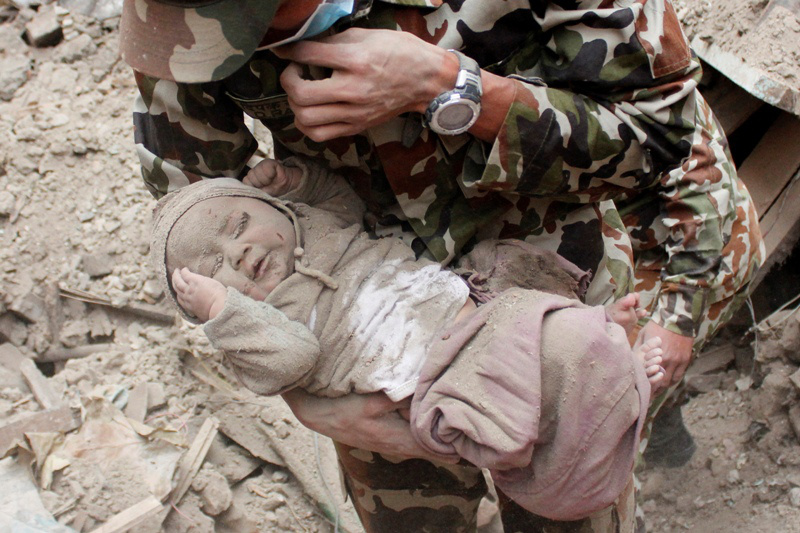
APTOPIX Nepal Earthquake Baby Rescue

4-month-old baby rescued from Nepal earthquake rubble : Source – globalnews.ca

   It was 25th April noon. I was heading back home by train and got my phone out to check the notifications.

first seen

The shocked post hit my timeline

A post on my Facebook timeline made me unconscious and even forgot what to do for like a minute. It brought me the news about the tragic earthquake happened in Nepal. For the next couple of hours I was busy with trying to contact my friends from Nepal and checking whether they are OK…The phone lines in Nepal were not properly working due to network failures. It was very hard to find out whether out friends and colleagues are secured.

During this disaster situation, the social media did a tremendous job by establishing communication channels as well as getting out the news from the affected areas an spreading them out worldwide.

Here I’ve listed out some social media and technological interventions came out as a relief for the victims of the disaster.

Tweeting birds carried the news as fast as they could!

As I noticed Twitter was the fastest channel of carrying out the news about the situation in affected areas .Tweets from the verified news sources even became news sources for local news channels.

With the help of hashtags it was easy even for the public to grab the info about the disaster. Here the graphs shows how vital #NepalEarthquake was during the situation.

Recognizing its importance as a tool for coordinating relief efforts, and as a backup for official channels of communication, Twitter says it will be concentrating its efforts in that direction.

“We aren’t a relief organization or an NGO,” the company says in an official blog post, “but we have mobilized a team to do three immediate things:

  1. Disseminate information and news about the disaster globally
  2. Help key nonprofits raise funds and material donations for victim relief
  3. Help local agencies coordinate relief efforts”

I would say Twitter is a powerful social media tool that can be occupied in various applications, even we couldn’t think of. So far Twitter is not just a useless bird now! 😀

Facebook; the giant of social media in the mission!

head

Facebook Safety check

In my case, My Facebook timeline was the first news source about the disaster for me. As many people were sharing news and posts about the earthquake, my Facebook timeline gradually became a news line.

Facebook Safety Check feature which was implemented after the 2011 Tsunami in Japan, was activated aftermath of the 7.9 magnitude earthquake that struck Nepal. Facebook’s Safety Check invites users to “mark themselves safe” if they are in the earthquake affected areas. Users can also check whether their friends are currently in the affected areas and if they have marked themselves safe.

It is quite good to see that people using social media channels for the social goodness.

safe

It was good to see all all my friends from Nepal marked Safe

If it is about computers, Google is there!

Google too has activated their Person Finder tool that was launched in the aftermath of the 2011 Haiti earthquake. It is an open source API that lets people create a ‘record’ of themselves.

It allows to track the whereabouts of their friends and family and subscribe to updates about people’s locations. The tool also lets you embed it on your website to enable people to search or track people’s locations.

I tried it with several entries, but for me it seems not so effective. Google should have develop further.

person finder

Google Person Finder

Make free calls with Viber & Skype

As many mobile networks were down for several hours, the voice calling services like Viber & Skype came out with free call facilities to and from Nepal.

“In light of the devastating events that have taken place in Nepal – and the subsequent impact to the local communications infrastructure – we are making all Skype calls to landlines and mobiles in and out of Nepal free of charge,* with immediate effect.” The skype team expressed their idea in their blog making skype calls free.

In this post disaster situation, many fund raising initiatives and help hand activities are going on with getting the help of social network reach. Those campaigns seems effective as millions of people engaged with social networks are clicking the like buttons and share the posts about a disaster even without having good sense.

Technology should always for the social goodness. Though social networks are pointed out as social beasts, here in a disaster situation they can act a vital role helping the victims using its tremendous reach and availability.

Will the social networks be the next disaster alert system?

North – Isn’t it Sri Lanka?

1097808684Aerial view of the lagoon in Jaffna Photo Alamy

Aerial view of the lagoon in Jaffna Photo : Alamy

 As I’m following my Masters degree I decided to do my research on “Education for Social Cohesion”. So my supervisor advised me to visit Sri Lanka and do the research there.”

Lora, a grad student from University of Amsterdam, Netherlands explained me her reason of visiting Sri Lanka.

“My supervisor said that it is the most convenient country to do my research because Sri Lanka is a country trying to stand steadily on the ashes after the thirty years long ethnic conflict. I searched the internet, found out that it’s a secure place for a girl to travel and I took my decision to make Sri Lanka my destination.”

I met Lora with a group of school children from Kurunegala, on their way to Jaffna. They were planning to visit a school in Jaffna and to have a friendship camp of three days to develop the bonds with their Tamil brothers and sisters. The program was organized by the Ministry of Education.

Lora was busy checking her mails it seemed like she expecting & important doc to receive.

“Any Problem?”

“Mmm… I’m waiting for the approval letter from Ministry of Defense to travel in North!”

Whaaaat!!! In the same country why a foreigner needs a paper to travel in a particular area! From the Ministry of Defense! Talk about it!!

Capture1

The link Appears in Ministry of Defense Web Site (Bottom right corner)

It’s true. As the announcement SL Army did on 15th October 2014, the foreign passport who wish to visit the North will have to obtain prior clearance from the MoD. According to army spokesperson Brigadier Ruwan Wanigasooriya, the curb was applicable to all foreign passport holders, including journalists.

Reference –

http://www.defence.lk/new.asp?fname=Foreign_Passport_holders_traveling_to_the_North_20141030_02

IN 2009 the SL forces defeated the LTTE terrorists and it became the turning point of the country. No doubts it is a great pleasure to breath in a country where there’s no gun fights and suicide bombers. As we all know some foreign agencies as well as with the support of some locals fed the terras. Getting the cover as iNGOs and NGOs they funded the terrorists to fight against the Sri Lankan government.

We have the bitter experience of the tsunami disaster in 2004. Many tsunami aids came from foreign agencies were pumped to feed the war! Even now LTTE diaspora is trying to arise conflicts in the Northern area. Some countries also trying to point their finger upon us complain of “War Crimes”.

But, as a country we are running in a post war era where we have to build a good image in the international. Tourism is a major industry of Sri Lanka that not only carries foreign currency into the country but also the tourists carry out the good name and the amazing hospitality they experienced during their stay here. That is the best way to make a good image in the international other than having nasty media shows.

So is it practical and effective to have such kind of dumb rules issuing a legal document for the foreigners as a “Visa within a Country”?

“I was but confused seeing that I have to get the approval from the Ministry of Defense. I mean in our countries it’s normally a closed authority! Even by getting this letter it feels somewhat insecure. I don’t think it is a good practice for a country like Sri Lanka promoting tourism.” Lora said.

“The security forces have imposed restrictions preventing all foreign passport holders (including British nationals) travelling to the Northern Province. All foreign passport holders planning to travel to the north must get prior approval from the Ministry of Defence. Military activities are ongoing. You should obey orders from the security forces and signs warning of the danger from land-mines. See Local travel – North

https://www.gov.uk/foreign-travel-advice/sri-lanka/safety-and-security

That’s how the UK government advising their citizens about traveling to Sri Lanka. Doesn’t this kind of mentions create a fury in tourists?

“I love this country. I was pretty amazed seeing the sandy beaches and I love the city Kandy! My parent also coming to visit Sri Lanka in December. I’m pretty sure they’ll not travel to Jaffna! 😀 “

Lora said with me showing some photos she took during her visit to Kandy.

My suggestion – Why this couldn’t done under the supervision of Tourism Ministry or such department? Just by putting a mask to the furious face MoD appears for the foreigners. It’ll be more effective and friendly than this doubtful process.